Understanding the AppArmor Vulnerability that Allows Any Local User to Break System Isolation and Gain Full Root Access.
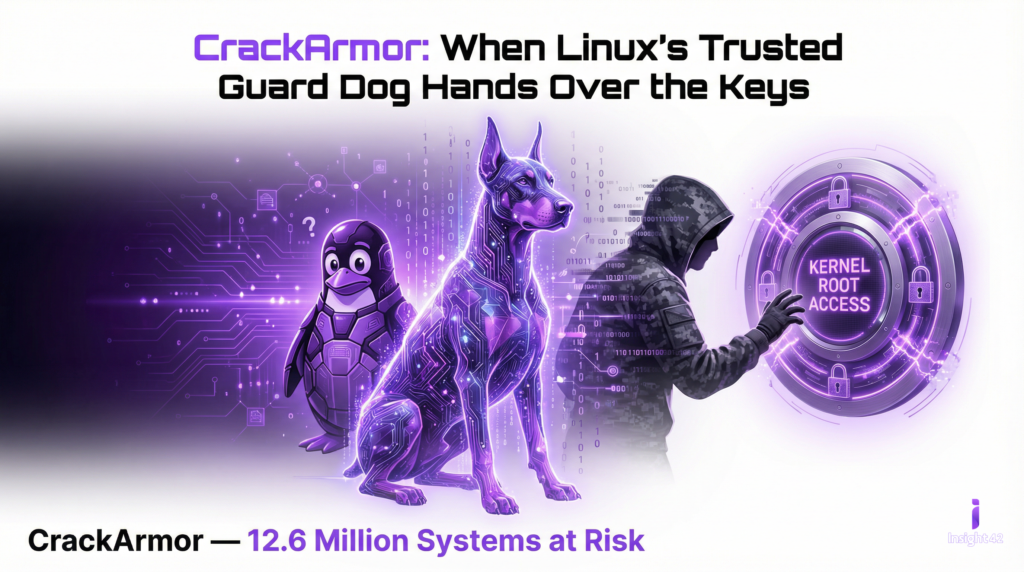
Since 2017, a silent flaw has been lurking within one of the most trusted security components of the Linux ecosystem. Dubbed “CrackArmor” by the Qualys Threat Research Unit (TRU), this cluster of nine vulnerabilities targets AppArmor, the default Mandatory Access Control (MAC) system for major Linux distributions like Ubuntu, Debian, and SUSE. With over 12.6 million enterprise systems affected globally—spanning cloud environments, Kubernetes clusters, and edge devices—CrackArmor represents a fundamental breakdown in how we enforce system isolation. Here is a deep dive into the mechanics of the vulnerability, how it operates under the hood, and what its exploitation looks like in the worst-case scenario. In particular, we now face the challenge of understanding how this AppArmor vulnerability allows any local user to break system isolation and gain full root access.
The Core Issue: A “Confused Deputy”
At its heart, CrackArmor is not a failure of the Mandatory Access Control concept, but rather an implementation flaw that creates a classic “confused deputy” scenario, resulting in unprecedented system isolation bypass—any local user can gain root access when exploiting this AppArmor vulnerability.
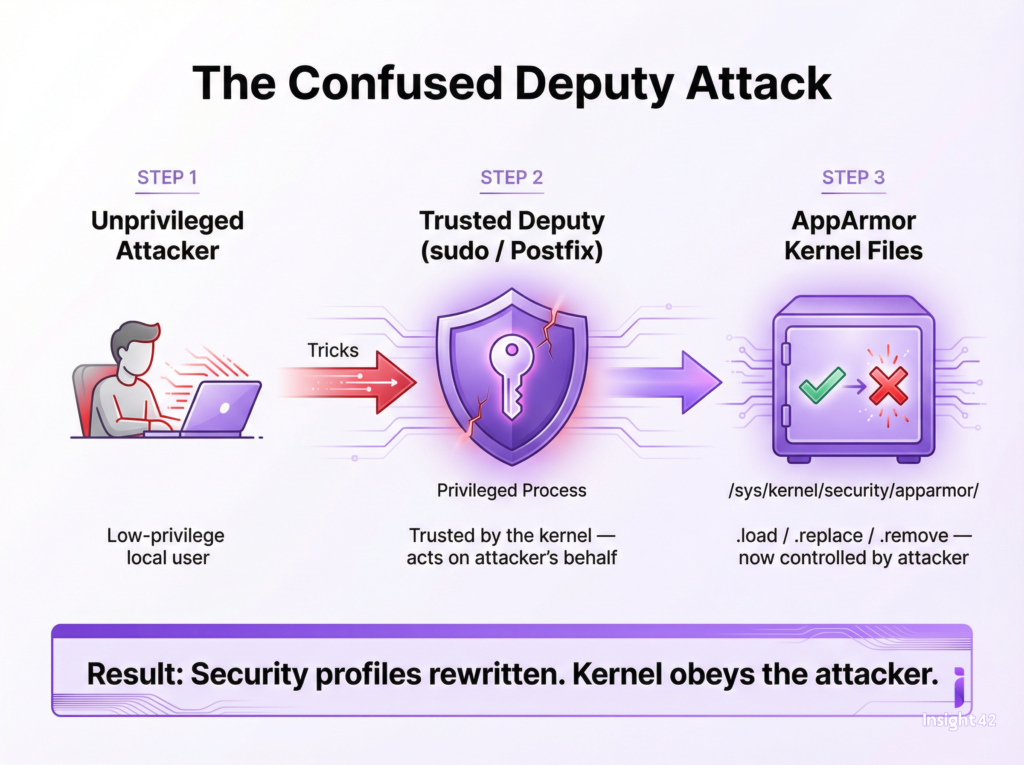
Imagine a secure facility where a low-level employee (the unprivileged user) is not allowed into the vault. However, the employee tricks the facility manager (a privileged process) into opening the vault on their behalf. Because the vault trusts the manager’s keys, the door opens. To illustrate, it is similar to understanding how AppArmor vulnerabilities grant local users power to break system isolation and obtain root access.
In the Linux kernel, unprivileged local attackers can exploit trusted applications—like sudo or the Postfix mail server—to interact with highly sensitive AppArmor pseudo-files located at /sys/kernel/security/apparmor/ (specifically the .load, .replace, and .remove files). By manipulating these privileged applications, an attacker can bypass user-namespace restrictions, manipulate security profiles, and force the kernel to execute unauthorized commands. Ultimately, this scenario exposes a vulnerability in AppArmor that lets local users break system isolation and achieve root access.
Technical Deep Dive: How the Exploit Chain Works
The CrackArmor vulnerabilities (partially tracked as CVE-2026-23268 and CVE-2026-23269) grant unprivileged users the power to rewrite the rules of the system’s security boundary. This enables several devastating attack vectors, and highlights why understanding how the AppArmor vulnerability allows any local user to break system isolation and reach full root access is crucial.
| Attack Vector | Description |
| Policy Manipulation | Attackers can dynamically load or remove AppArmor profiles. For example, they could remove the protective profiles for rsyslogd or cupsd, exposing them to remote attacks, or load a “deny-all” profile for sshd, instantly locking legitimate administrators out of remote SSH access. |
| Namespace Breakouts | By loading a “userns” profile for standard binaries (like /usr/bin/time), an attacker can spawn fully capable user namespaces. This effectively neutralizes Ubuntu’s user-namespace restrictions, allowing an attacker to break out of isolated containers. The exploit chain centers on AppArmor vulnerabilities that enable any local user to break system isolation and escalate privileges to root. |
| Kernel-Space Exploitation | A use-after-free vulnerability in the aa_loaddata kernel routine allows attackers to reallocate a freed memory page as a page table that maps to /etc/passwd. By doing this, the attacker can overwrite the root password line directly in memory and seamlessly switch to a full root shell. To further clarify, this kernel-space exploitation ties directly to understanding the AppArmor vulnerability which enables breaking system isolation and full root access by any local user. |
The Worst-Case Scenario
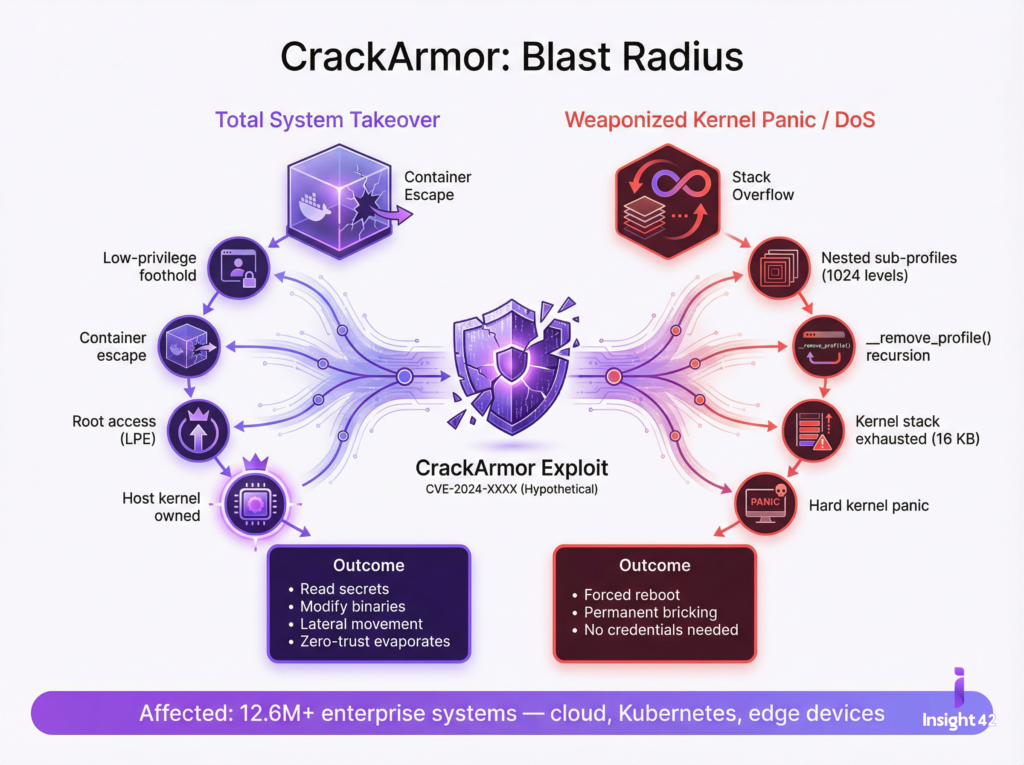
If CrackArmor is successfully weaponized by a malicious actor, the blast radius is catastrophic. The worst-case scenario manifests in two primary ways: Total System Takeover and Catastrophic Denial of Service (DoS). Indeed, understanding the AppArmor vulnerability that allows any local user to break system isolation and gain full root access is vital for grasping the scope of these risks.
1. Complete Cloud and Container Collapse (Total Compromise)
In a modern infrastructure relying on Kubernetes or Docker, AppArmor serves as the foundational wall keeping containers isolated from one another and from the host OS. In a worst-case scenario, an attacker who gains a low-level, unprivileged foothold (e.g., via a compromised web app or a leaked low-privilege SSH key) can instantly break out of their containerized sandbox. This demonstrates a practical outcome from the AppArmor vulnerability: a local user can break system isolation and become root.
By executing the aa_loaddata use-after-free exploit, they achieve Local Privilege Escalation (LPE) to root. From there, they own the host kernel. They can read sensitive secrets from other containers, modify system binaries, tamper with credentials, or pivot laterally to infect the rest of the network. The zero-trust boundary evaporates instantly, another direct result of how AppArmor vulnerabilities let local users break isolation and gain root access.
2. Weaponized Kernel Panics (Denial of Service)
State-sponsored actors and ransomware gangs increasingly favor disruptive attacks. CrackArmor provides a literal “kill switch” for the Linux kernel. Thus, understanding this AppArmor vulnerability that lets any user break system isolation and reach root access is essential for defense planning.
AppArmor profiles can contain nested sub-profiles. CrackArmor allows an attacker to manipulate the kernel’s recursive removal routine (__remove_profile()). By feeding the system a deeply nested hierarchy of sub-profiles (e.g., 1024 levels deep), the kernel attempts to process them all at once. This triggers a recursive loop that completely exhausts the kernel stack (which is severely limited to roughly 16 KB on x86-64 architectures). The immediate result? A hard kernel panic and a forced system reboot, again associated with the impact of AppArmor flaws that allow local users to break isolation and gain root.
An attacker could script this to happen continuously on boot, permanently bricking critical cloud nodes, energy sector infrastructure, or healthcare databases without ever needing administrative credentials. Importantly, this highlights the consequences of understanding the AppArmor vulnerability that enables local users to break system isolation and access root privileges.
Conclusion and Mitigation
CrackArmor is a stark reminder that even the most deeply entrenched, default security controls are subject to fatal flaws. Patching alone is critical, but security teams must also re-evaluate their reliance on default configurations. In closing, it is crucial to understand the AppArmor vulnerability that allows local users to break system isolation and gain full root access, so new measures can be implemented.
Immediate Steps for Administrators:
- Patch Instantly: Apply the vendor kernel updates (spanning kernels from v4.11 onward) immediately. This is not a vulnerability that can wait for the next maintenance window. Proactive patching is especially important given how AppArmor vulnerabilities let local users break isolation and become root.
- Monitor Integrity: Implement strict file integrity monitoring on the /sys/kernel/security/apparmor/ directory to catch unauthorized .load or .replace modifications, which serve as the primary indicators of an active CrackArmor exploit. In short, monitoring is a mitigation strategy to address the risk from AppArmor vulnerabilities where system isolation can be broken and root access gained by any user.
- Scan Assets: Utilize vulnerability scanners to map out all instances of Ubuntu, Debian, and SUSE running vulnerable kernel versions across all edge, cloud, and containerized environments. This is vital due to the potential for any local user to break system isolation and reach root through the AppArmor flaw.