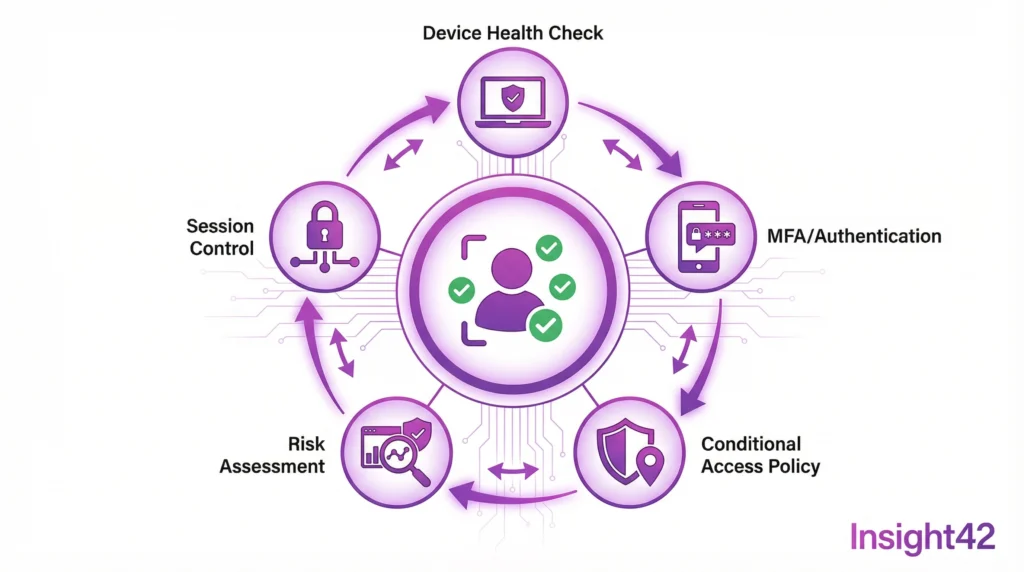
Identity is the New Perimeter
Firewalls alone are no longer enough. Employees work from anywhere. Cloud services are distributed. Identity has become the central security anchor. Zero Trust is the answer.
This is particularly relevant for the public sector, where sensitive citizen data must be protected. A migration to Microsoft Entra ID creates the foundation for SSO, MFA and Conditional Access — and covers a substantial part of the identity and access management criteria in BSI C5, IT-Grundschutz and NIS2.
What Zero Trust Means
Zero Trust is a security model: never trust, always verify. Every access attempt is checked. Every identity is validated.
It sounds strict, and it is. But it works. Attacks are made more difficult. Lateral movement is prevented. A BSI-compliant cloud security concept recommends this approach.
The Pillars of Zero Trust
Verify Identity
Who is accessing the resource? Is the person who they claim to be? Multi-Factor Authentication is mandatory. Passwords alone are not enough.
Validate Device
From which device is the access coming? Is it managed? Is it compliant? Conditional Access checks these factors.
Minimise Access
The principle of least privilege applies. Only necessary rights, only for the necessary time. Just-in-Time access becomes the standard.
Monitor Activities
Every access is logged. Anomalies are detected. Automated responses are triggered.
Quick Checklist: Zero Trust Implementation
| Component | Action | Priority |
| MFA | Enable for all users | Critical |
| SSO | Set up Single Sign-On | High |
| Conditional Access | Create baseline policies | High |
| PIM | Implement Privileged Identity Management | High |
| Device Compliance | Define device policies | Medium |
| App Protection | Configure application protection | Medium |
| Monitoring | Monitor sign-in logs | Medium |
To-Do List for Entra ID Migration
- Immediately: Enable MFA for administrators.
- Week 1: Take inventory of identities.
- Week 2: Define the SSO strategy.
- Week 3: Plan Conditional Access policies.
- Month 1: Migrate a pilot group.
- Month 2: Roll out to all users.
- Month 3: Implement PIM.
SSO Simplifies and Secures
Single Sign-On is not a luxury; it is a security feature. Fewer passwords mean less risk. Users use strong passwords because they only need one.
Entra ID enables SSO for thousands of applications, both in the cloud and on-premises. SAML, OAuth, and OpenID Connect are all supported — which is why identity is usually the first workload in a public-sector cloud migration.
Implementing MFA Correctly
Multi-Factor Authentication is mandatory. BSI C5 compliance without MFA? Impossible. IT-Grundschutz and NIS2 require it as well.
But MFA must be user-friendly. Authenticator apps are standard. Biometrics where possible. Hardware tokens (FIDO2) for high security and phishing resistance.
Conditional Access makes MFA intelligent. Not for every login, only when there is a risk. Unknown device? MFA. Unusual location? MFA. We cover the policy design in detail in Conditional Access and MFA: Intelligent Access Control for the Public Sector.
Protecting Privileged Identities
Administrators are prime targets. Their accounts have extensive rights. Privileged Identity Management (PIM) protects them.
The principle is Just-in-Time access. Rights are activated only when needed, for a limited time, and with approval. A BSI-compliant cloud security concept and KRITIS cloud security both demand these controls.
Insight42 Identity Services
We plan and implement Entra ID migrations with Zero Trust as the default: SSO strategy, MFA rollout, Conditional Access baselines, PIM and monitoring — from strategy to operation, including managed identity services for public authorities.
Secure your identities. See cloud security consulting or contact us.