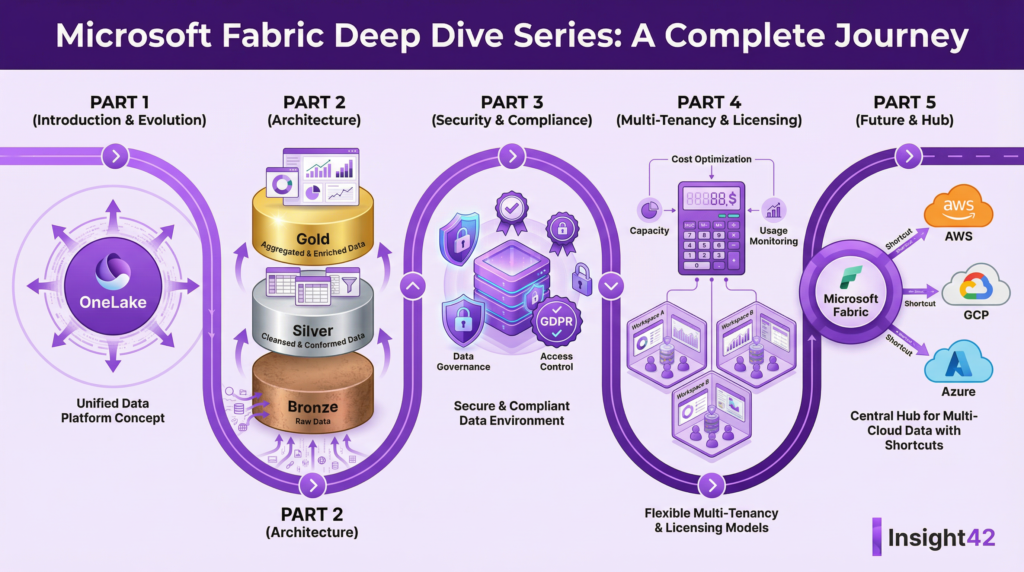
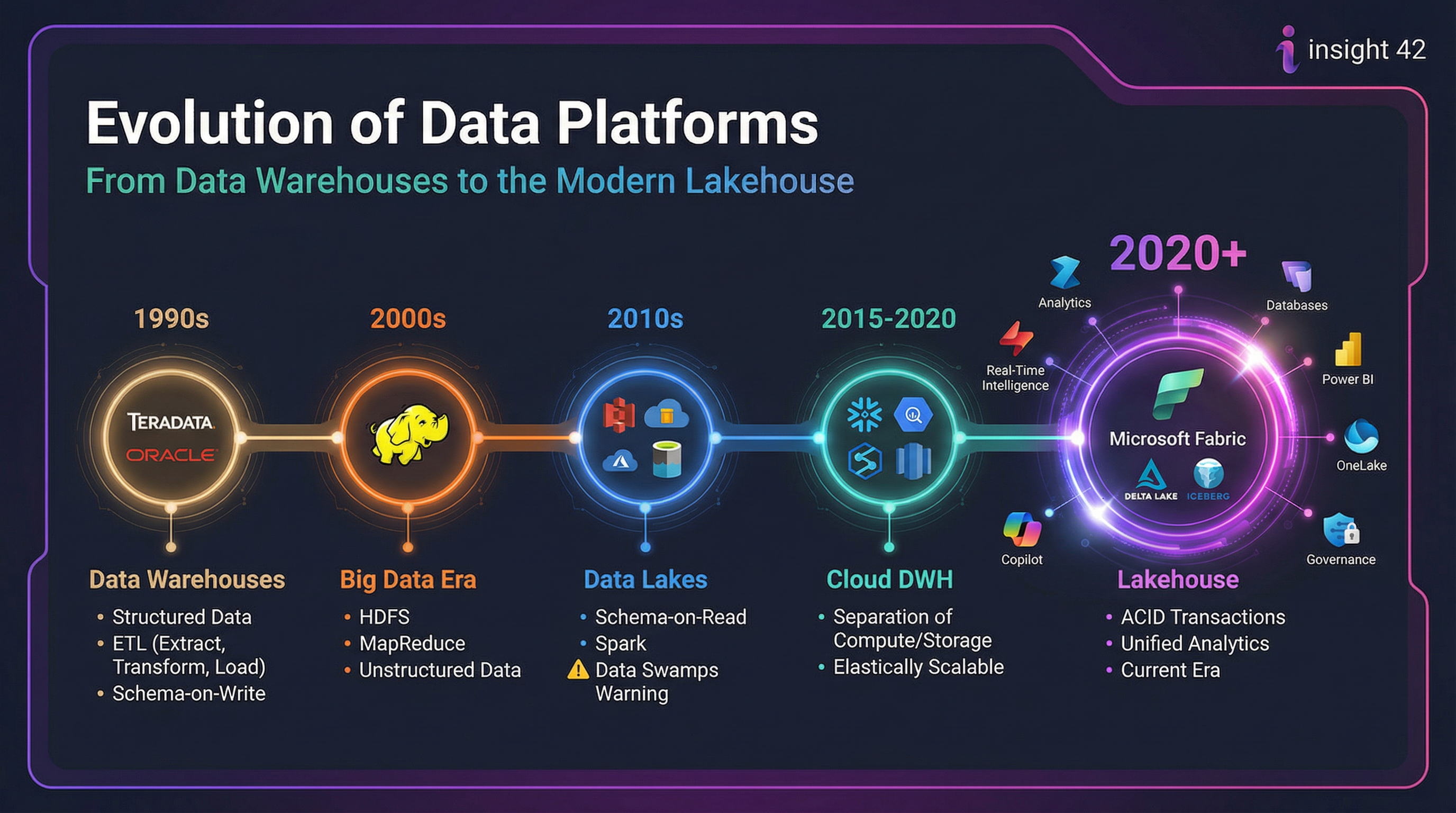
A complete walkthrough of architecture, governance, security, and best practices for building a unified data platform.

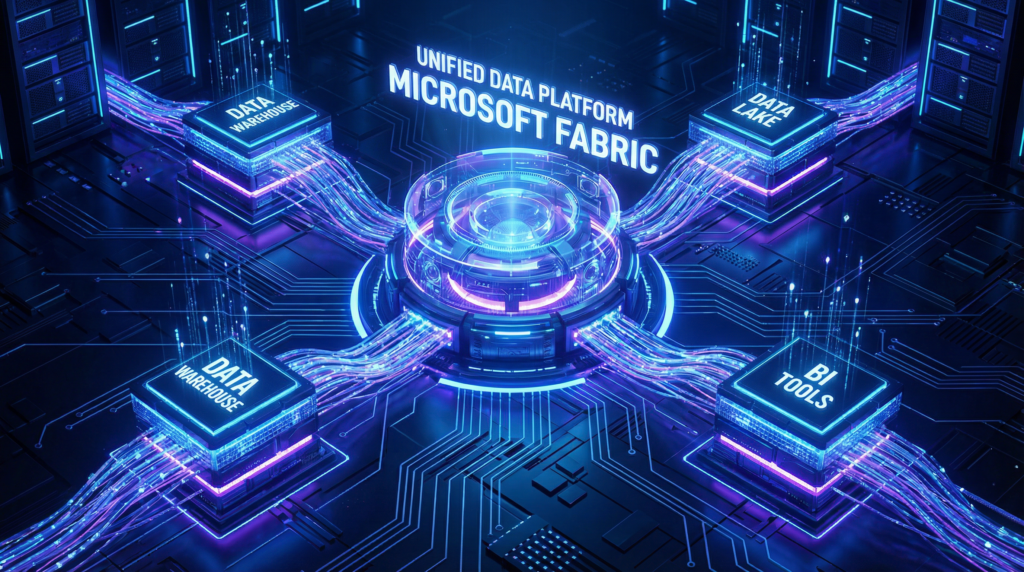
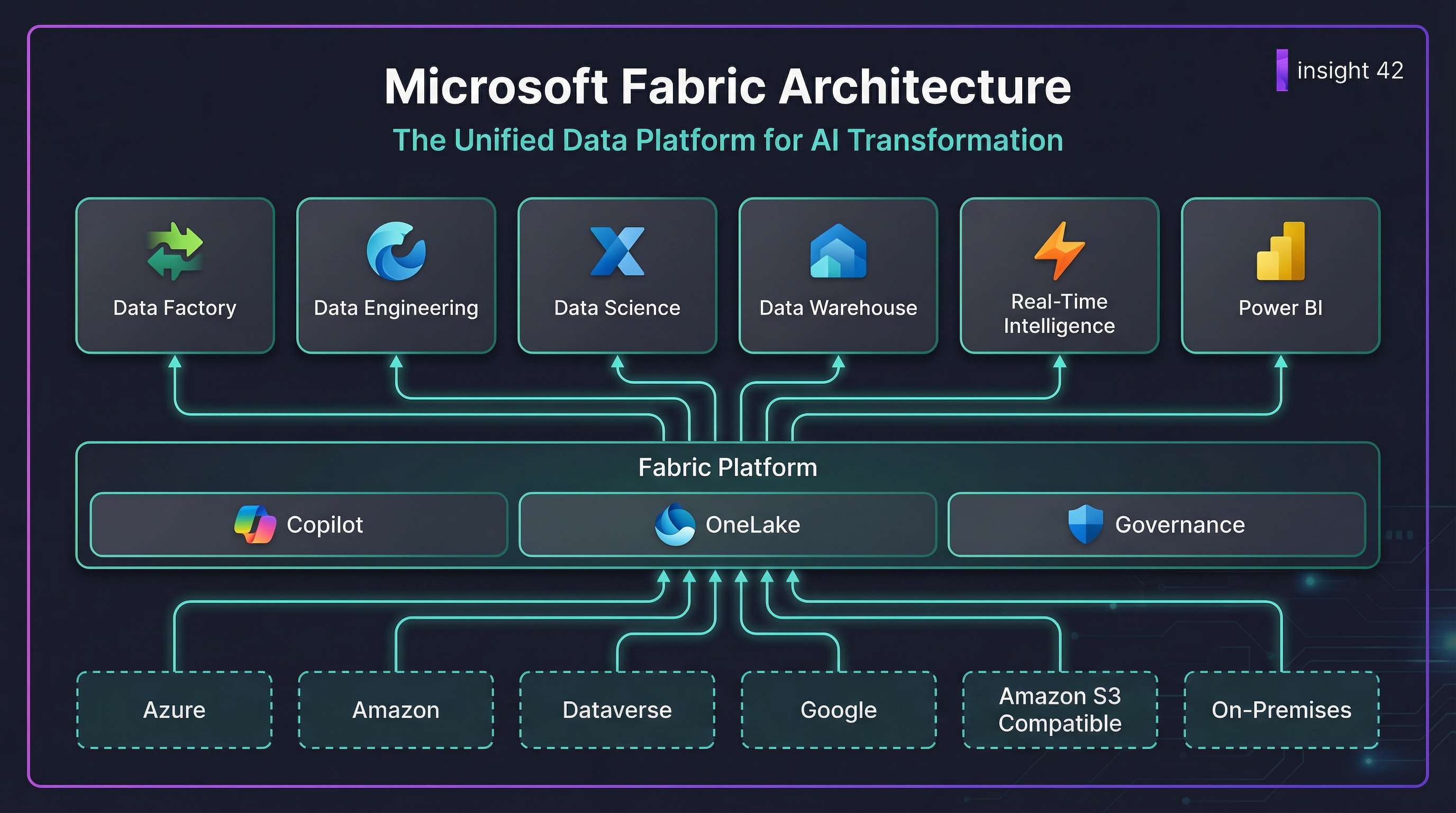
A unified data platform concept for Microsoft Fabric.
Meta title (SEO): Microsoft Fabric Definitive Guide (2026): OneLake, Security, Governance, Architecture & Best Practices
Meta description: The most practical, end-to-end guide to Microsoft Fabric for business and technical leaders. Learn how to unify data engineering, warehousing, real-time analytics, data science, and BI on OneLake.
Primary keywords: Microsoft Fabric, OneLake, Lakehouse, Data Warehouse, Real-Time Intelligence, Power BI, Microsoft Purview, Fabric security, Fabric capacity, data platform architecture, data sprawl, medallion architecture
Key Takeaways
- Microsoft Fabric is a unified analytics platform that aims to solve the problem of data platform sprawl by integrating various data services into a single SaaS offering.
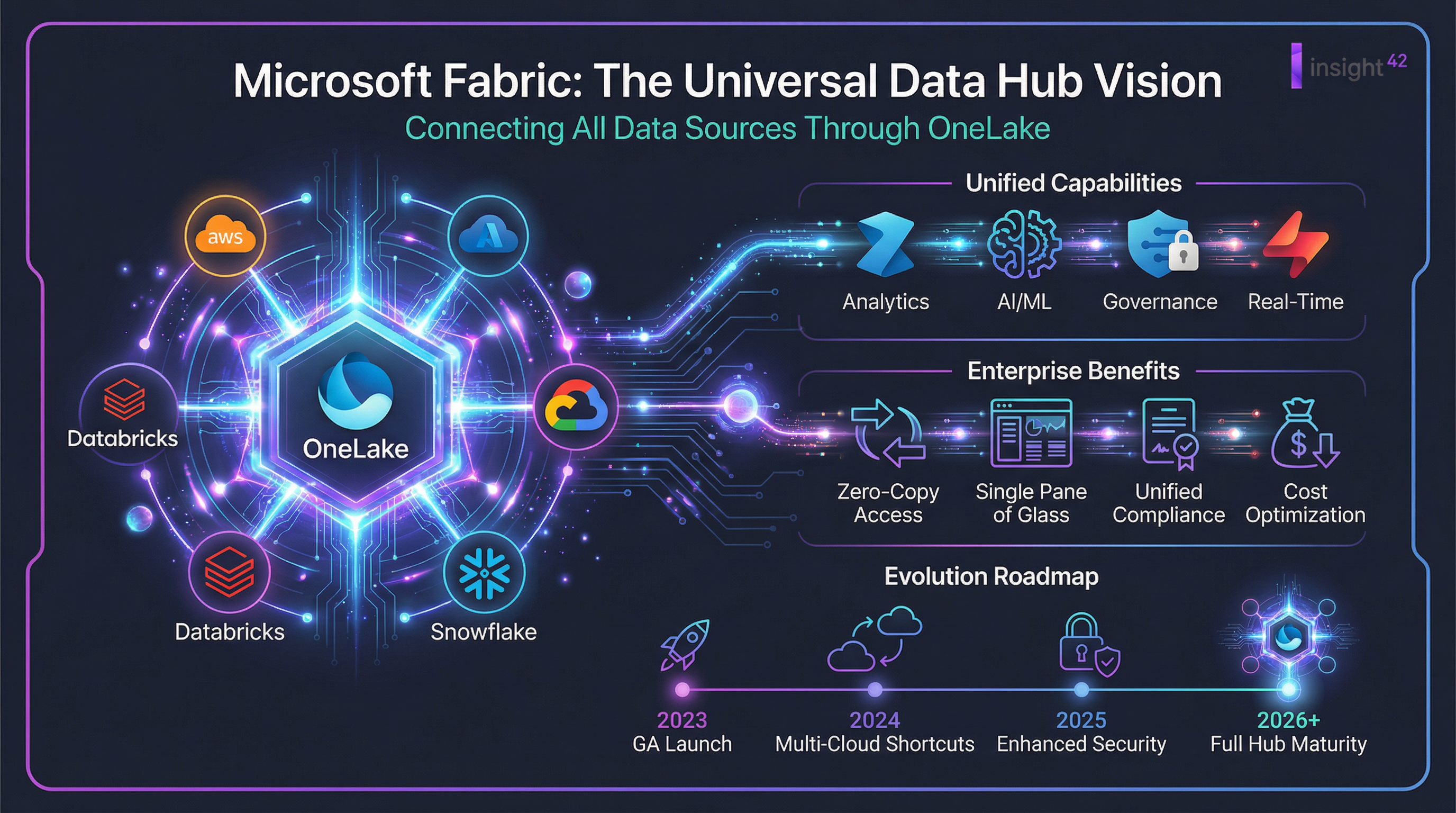
- OneLake is the centerpiece of Fabric, acting as a single, logical data lake for the entire organization, similar to OneDrive for data.
- Fabric offers different “experiences” for various roles, such as data engineering, data science, and business intelligence, all built on a shared foundation.
- The platform uses a capacity-based pricing model, which allows for scalable and predictable costs.
- Security and governance are built-in, with features like Microsoft Purview integration, fine-grained access controls, and private links.
- A well-defined rollout plan is crucial for a successful Fabric adoption, starting with a discovery phase, followed by a pilot, and then a full production rollout.
Who is this guide for?
This guide is for business and technical leaders who are evaluating or implementing Microsoft Fabric. It provides a comprehensive overview of the platform, from its core concepts to a practical rollout plan. Whether you are a CIO, a data architect, or a BI manager, this guide will help you understand how to leverage Fabric to build a modern, scalable, and secure data platform.
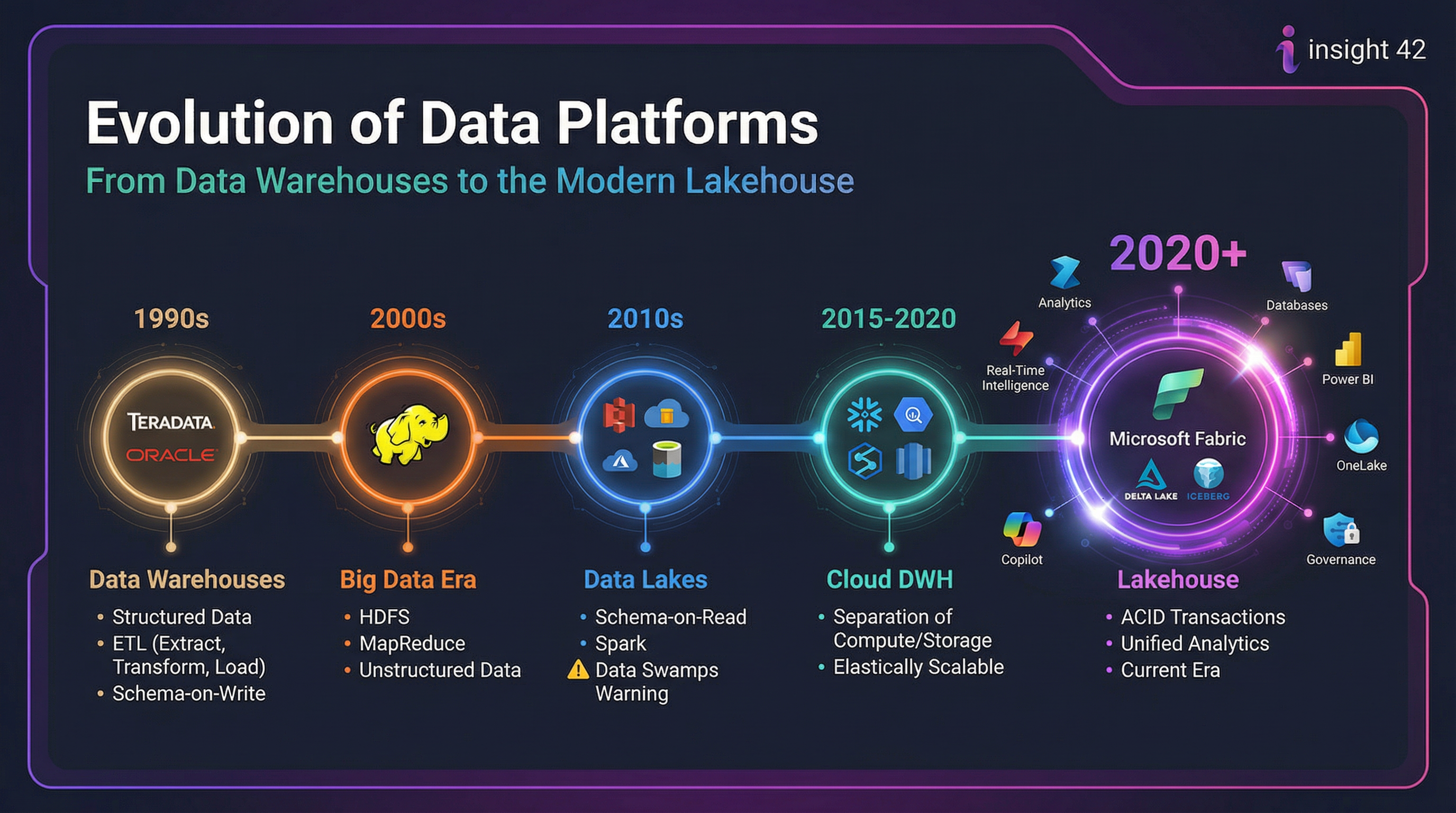
Why Microsoft Fabric exists (in plain language)
Most organizations don’t have a “data problem”—they have a data platform sprawl problem:
- Multiple tools for ingestion, transformation, and reporting
- Duplicate data copies across lakes/warehouses/marts
- Inconsistent security rules between engines
- A governance gap (lineage, classification, ownership)
- Cost surprises when teams scale
Microsoft Fabric was designed to reduce that sprawl by delivering an end-to-end analytics platform as a SaaS service: ingestion → transformation → storage → real-time → science → BI, all integrated.
If your goal is a platform that business teams can trust and technical teams can scale, Fabric is fundamentally about unification: common storage, integrated experiences, shared governance, and a capacity model you can manage centrally.
What is Microsoft Fabric? (the one-paragraph definition)
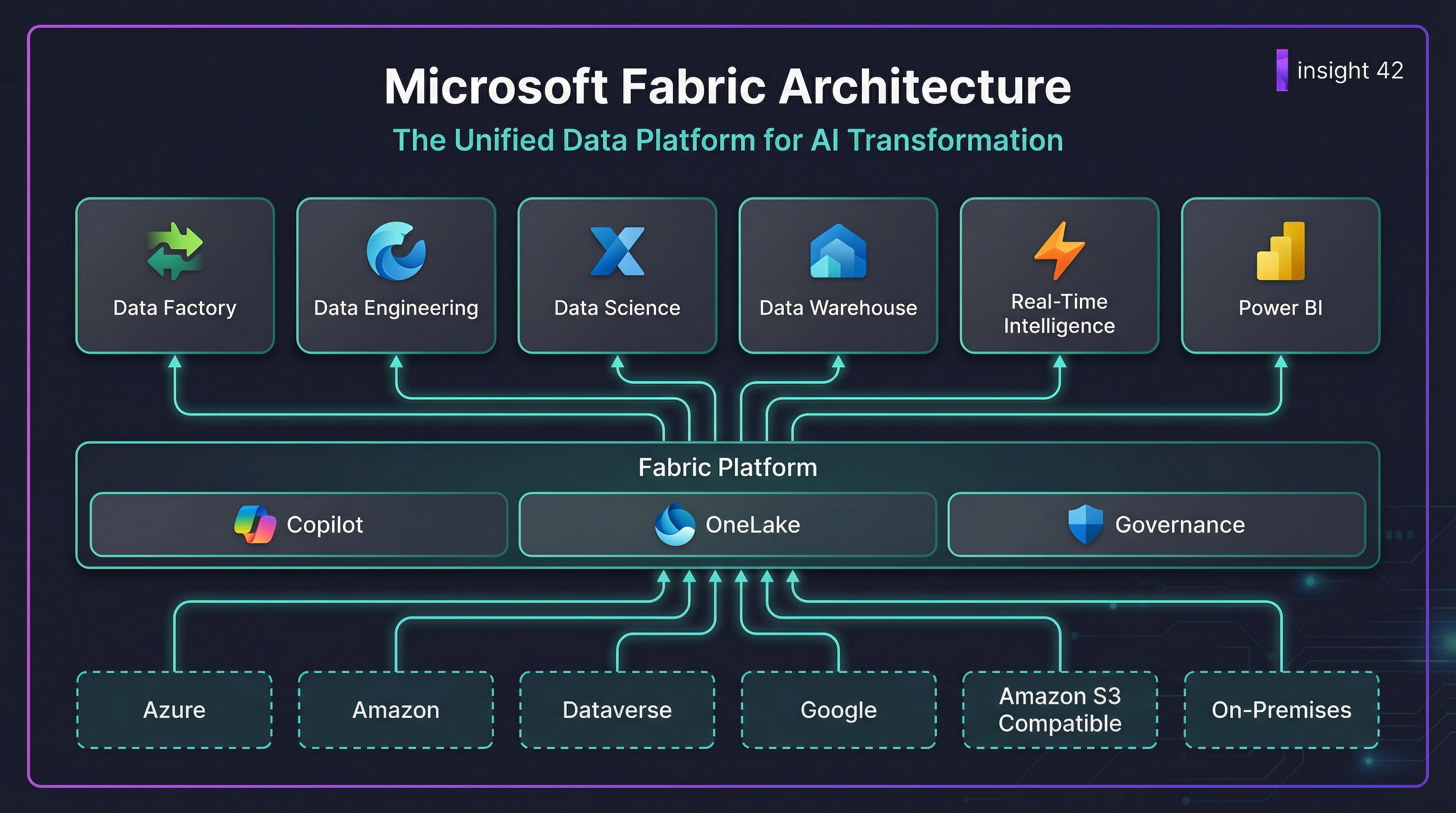
Microsoft Fabric is an analytics platform that supports end-to-end data workflows—data ingestion, transformation, real-time processing, analytics, and reporting—through integrated experiences such as Data Engineering, Data Factory, Data Science, Real-Time Intelligence, Data Warehouse, Databases, and Power BI, operating over a shared compute and storage model with OneLake as the centralized data lake.
The Fabric mental model: the 6 building blocks that matter
1) OneLake = the “OneDrive for data”
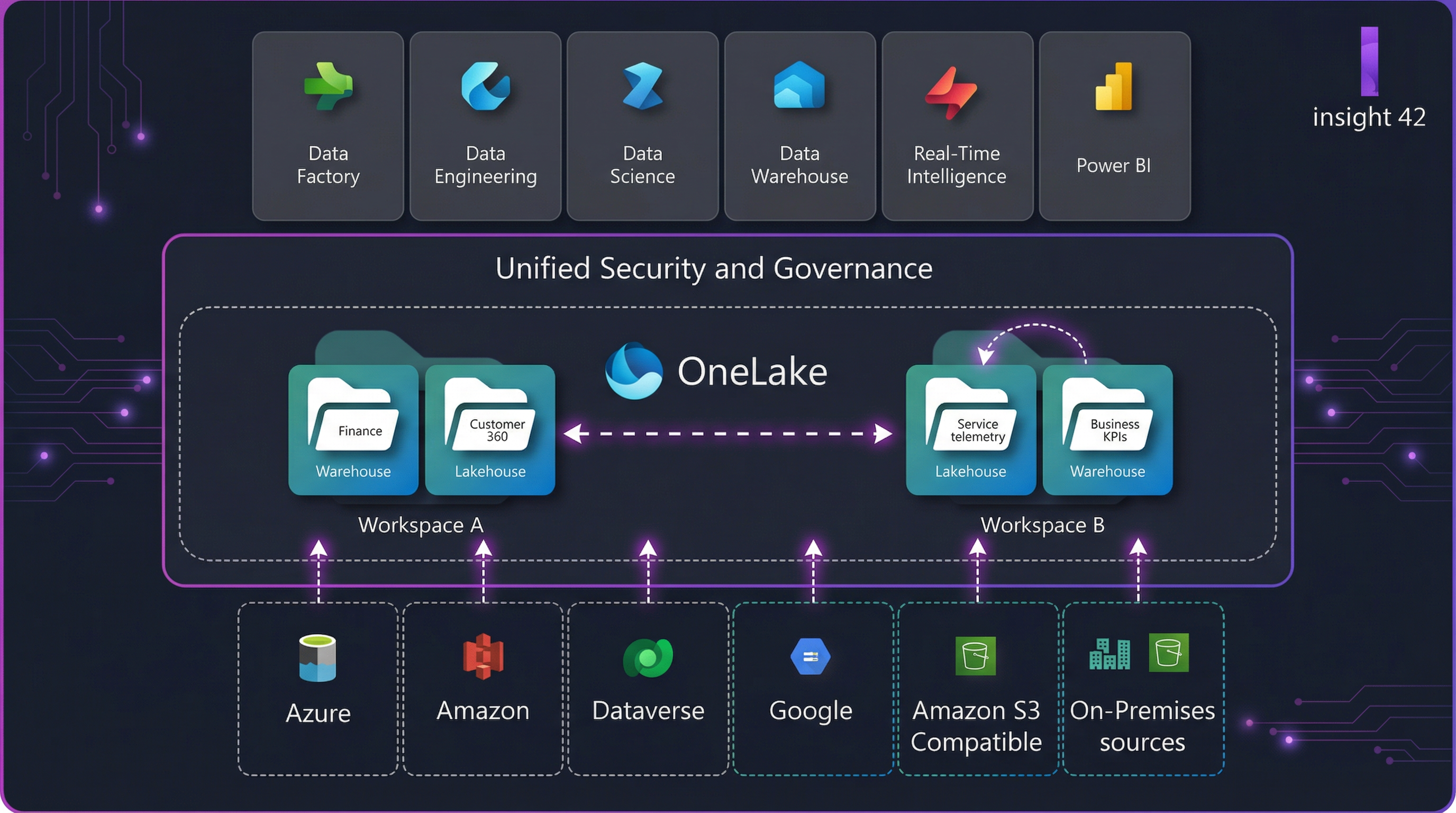
OneLake is Fabric’s single logical data lake. Fabric stores items like lakehouses and warehouses in OneLake, similar to how Office stores files in OneDrive. Under the hood, OneLake is built on ADLS Gen2 concepts and supports many file types.

OneLake acts as a single, logical data lake for the entire organization.
Why this matters: OneLake is the anchor that makes “one platform” real—shared storage, consistent access patterns, fewer duplicate copies.
2) Experiences (workloads) = role-based tools on the same foundation
Fabric exposes different “experiences” depending on what you’re doing—engineering, integration, warehousing, real-time, BI—without making you stitch together separate products.
3) Items = the concrete things teams build
In Fabric, you build “items” inside workspaces (think: lakehouse, warehouse, pipelines, notebooks, eventstreams, dashboards, semantic models). OneLake stores the data behind these items.
4) Capacity = the knob you scale (and govern)
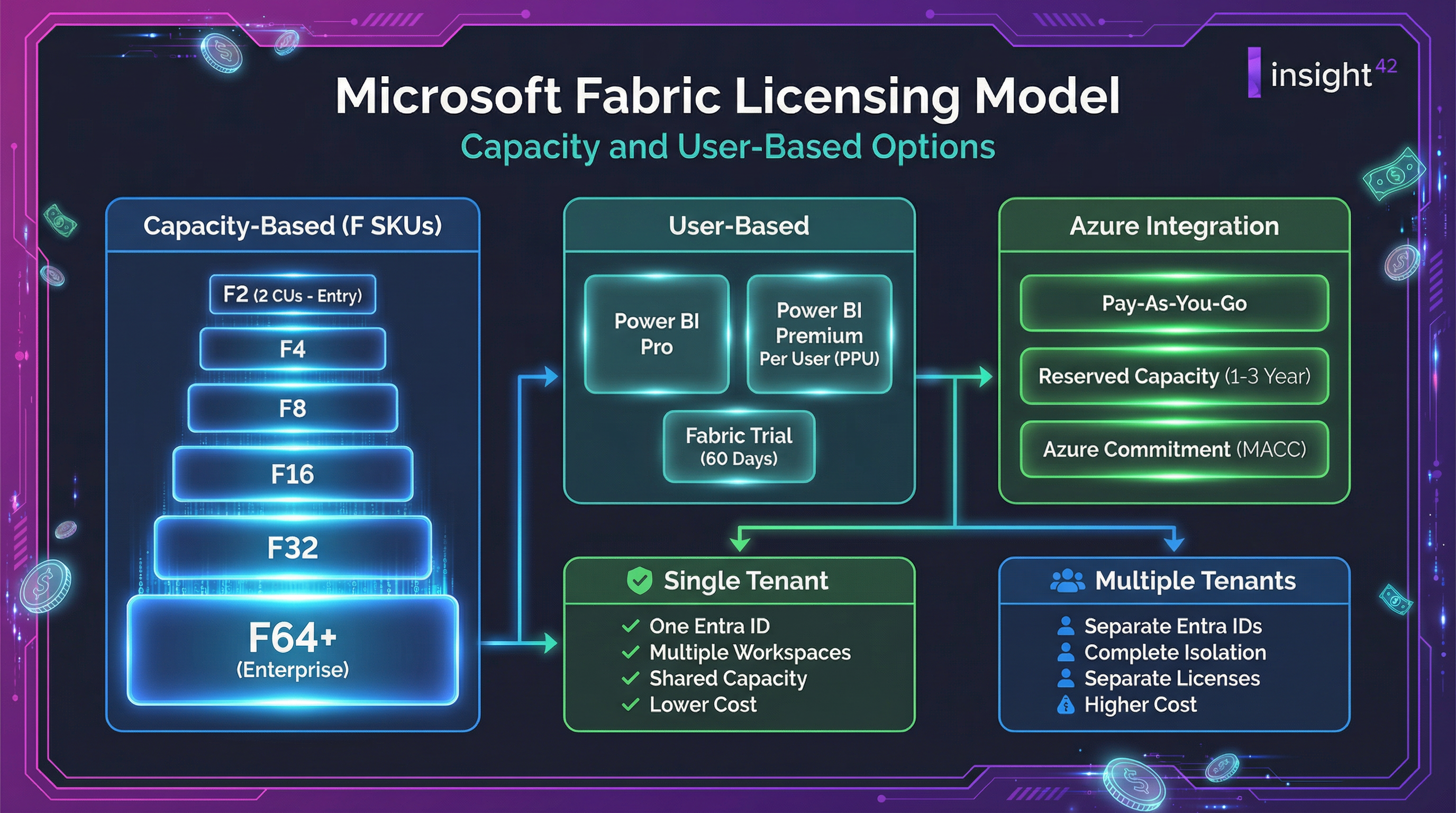
Fabric uses a capacity-based model (F SKUs). You can scale up/down dynamically and even pause capacity (pay-as-you-go model).
5) Governance = make it discoverable, trusted, compliant
Fabric includes governance and compliance capabilities to manage and protect your data estate, improve discoverability, and meet regulatory requirements.
6) Security = consistent controls across engines
Fabric has a layered permission model (workspace roles, item permissions, compute permissions, and data-plane controls like OneLake security).
Choosing the right storage: Lakehouse vs Warehouse vs “other”
This is where many Fabric projects either become elegant—or messy.

A visual comparison of the flexible Lakehouse and the structured Data Warehouse.
Lakehouse (best when you want flexibility + Spark + open lake patterns)
Use a Lakehouse when:
- You’re doing heavy data engineering and transformations
- You want medallion patterns (bronze/silver/gold)
- You’ll mix structured + semi-structured data
- You want Spark-native developer workflows
Warehouse (best when you want SQL-first analytics and managed warehousing)
Fabric Data Warehouse is positioned as a “lake warehouse” with two warehousing items (warehouse item + SQL analytics endpoint) and includes replication to OneLake files for external access.
Real-Time Intelligence (best for streaming events, telemetry, “data in motion”)
Real-Time Intelligence is an end-to-end solution for event-driven scenarios—handling ingestion, transformation, storage, analytics, visualization, and real-time actions.
Eventstreams can ingest and route events without code and can expose Kafka endpoints for Kafka protocol connectivity.
Discovery: how to decide if Fabric is the right platform (business + technical)
Step 1 — Identify 3–5 “lighthouse” use cases
Pick use cases that prove the platform across the lifecycle:
- Executive BI: certified metrics + governed semantic model
- Operational analytics: near-real-time dashboards + alerts
- Data engineering: ingestion + transformations + orchestration
- Governance: lineage + sensitivity labeling + access controls
Step 2 — Score your current pain (and expected value)
Use a simple scoring matrix:
- Time-to-insight (days → hours?)
- Data trust (single source of truth?)
- Security consistency (one model vs many?)
- Cost predictability (capacity governance?)
- Reuse (shared datasets and pipelines?)
Step 3 — Confirm your constraints early (these change architecture)
- Data residency and tenant requirements
- Identity model (Entra ID groups, RBAC approach)
- Network posture (public internet vs private links)
- Licensing & consumption model (broad internal distribution?)
The reference architecture: a unified Fabric platform that scales
Here’s a proven blueprint that works for most organizations.

A 5-layer reference architecture for a unified data platform in Microsoft Fabric.
Layer 1 — Landing + ingestion
Goal: bring data in reliably, with minimal coupling.
- Use Data Factory style ingestion/orchestration (pipelines, connectors, scheduling)
- Land raw data into OneLake (often “Bronze”)
- Keep ingestion contracts explicit (schemas, SLAs, source owners)
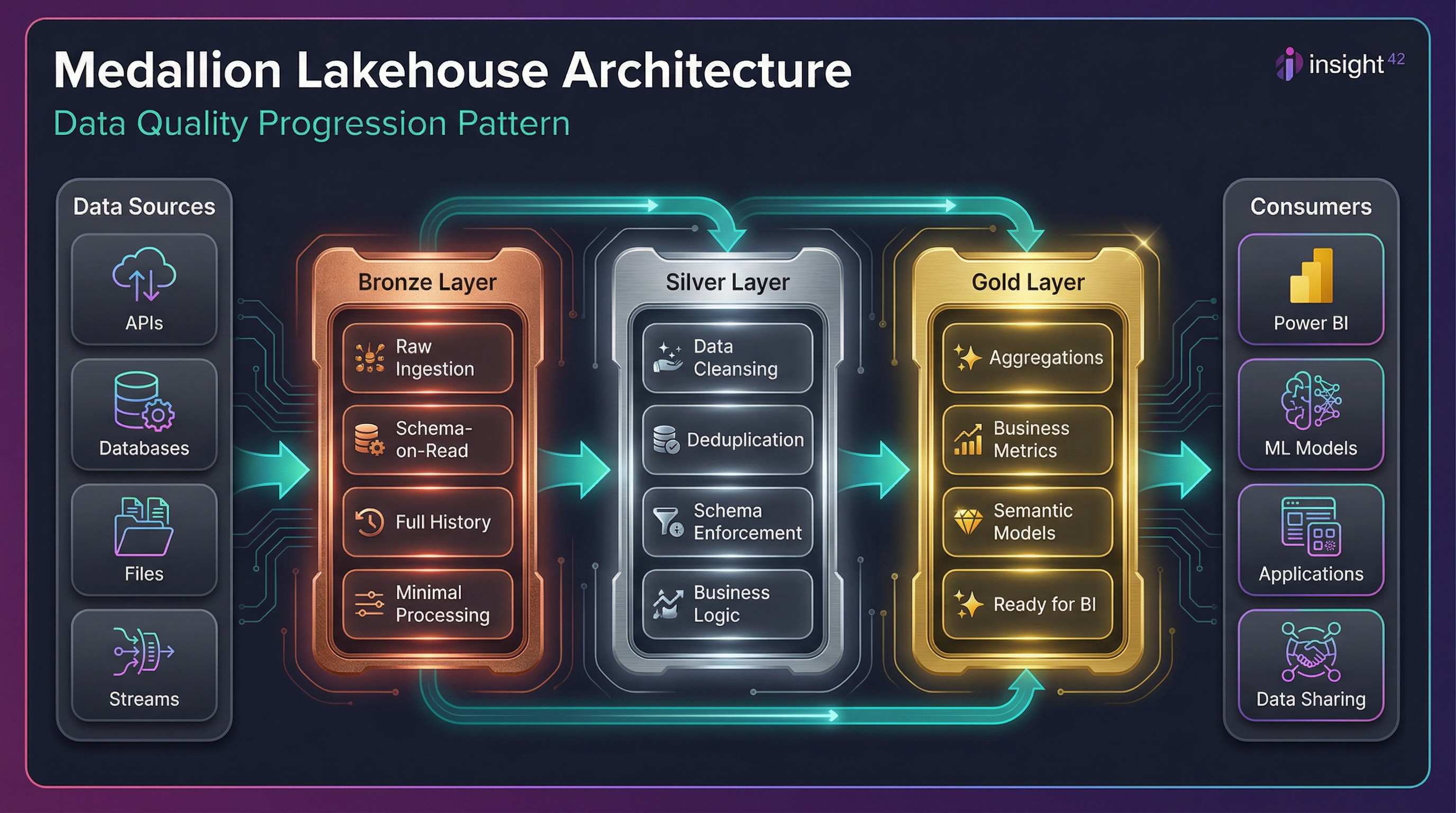
Layer 2 — Transformation (medallion pattern)
Goal: create reusable, tested datasets.

The Medallion Architecture (Bronze, Silver, Gold) for data transformation.
- Bronze: raw, append-only, immutable where possible
- Silver: cleaned, conformed, deduplicated
- Gold: curated, analytics-ready, business-friendly
Layer 3 — Serving & semantics
Goal: standardize definitions so the business stops arguing about numbers.
Gold tables feed:
- Warehouse / SQL endpoints for SQL-first analytics
- Power BI semantic models for governed metrics and reports (within Fabric’s unified environment)
Layer 4 — Real-time lane (optional but powerful)
Goal: detect and act on events quickly (minutes/seconds).
- Ingest with Eventstreams
- Store/query using Real-Time Intelligence components
- Trigger actions with Activator (no/low-code event detection and triggers)
Layer 5 — Governance & security plane (always on)
Goal: everything is discoverable, classifiable, and controlled.
- Microsoft Purview integration for governance
- Fabric governance and compliance capabilities (lineage, protection, discoverability)
Security: how to build “secure by default” without slowing teams down
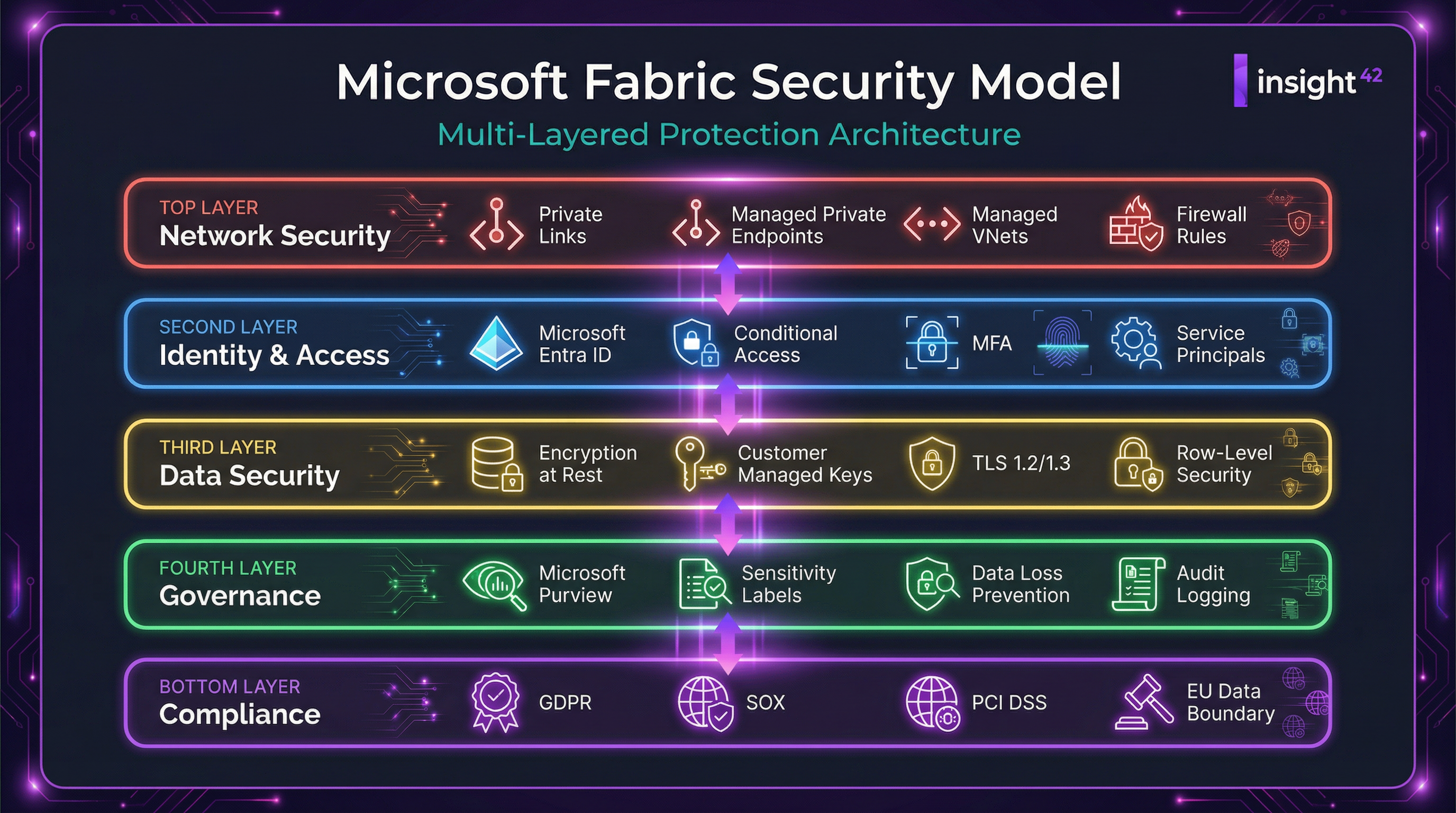
Understand the Fabric permission layers
Fabric uses multiple permission types (workspace roles, item permissions, compute permissions, and OneLake security) that work together.

A layered security permission model in Microsoft Fabric.
Practical rule:
- Workspace roles govern “who can do what” in a workspace
- Item permissions refine access per artifact
- OneLake security governs data-plane access consistently
OneLake Security (fine-grained, data-plane controls)
OneLake security enables granular, role-based security on data stored in OneLake and is designed to be enforced consistently across Fabric compute engines (not per engine). It is currently in preview.
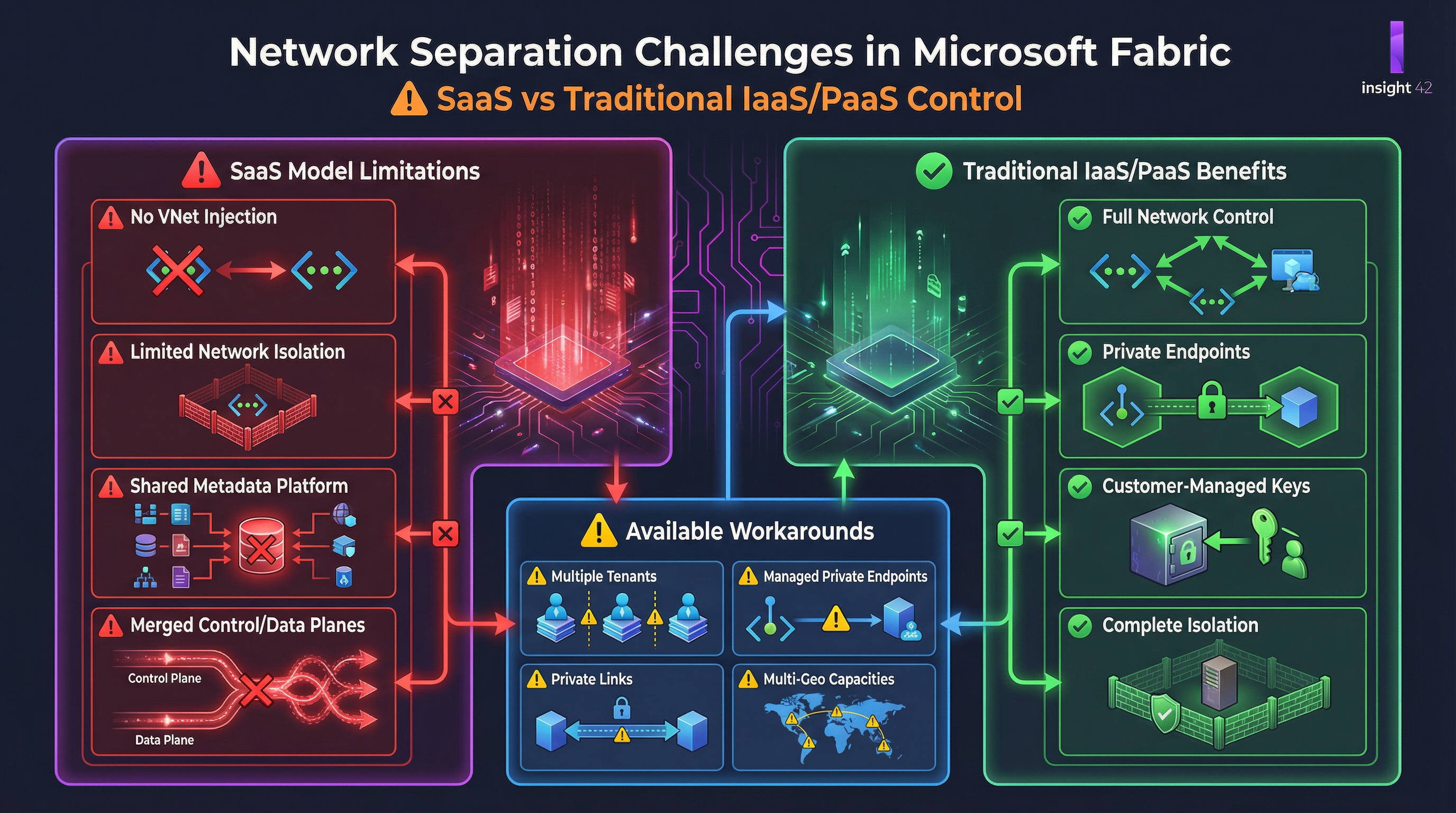
Network controls: private connectivity + outbound restrictions
If your organization needs tighter network posture:
- Fabric supports Private Links at tenant and workspace levels, routing traffic through Microsoft’s private backbone.
- You can enable workspace outbound access protection to block outbound connections by default, then allow only approved external connections (managed private endpoints or rules).
Governance & compliance capabilities
Fabric provides governance/compliance features to manage, protect, monitor, and improve discoverability of sensitive information.
A “good default” governance model:
- Standard workspace taxonomy (by domain/product, not by team names)
- Defined data owners + stewards
- Certified datasets + endorsed metrics
- Mandatory sensitivity labels for curated/gold assets (where applicable)
Capacity & licensing: the essentials (what leaders actually need to know)
Fabric uses capacity SKUs and also has important Power BI licensing implications.
Key official points from Microsoft’s pricing documentation:
- Fabric capacity can be scaled up/down and paused (pay-as-you-go approach).
- Power BI Pro licensing requirements extend to Fabric capacity for publishing/consuming Power BI content; however, with F64 (Premium P1 equivalent) or larger, report consumers may not require Pro licenses (per Microsoft’s licensing guidance).
How to translate this into planning decisions:
- If your strategy includes broad internal distribution of BI content, licensing and capacity sizing should be evaluated together—not separately.
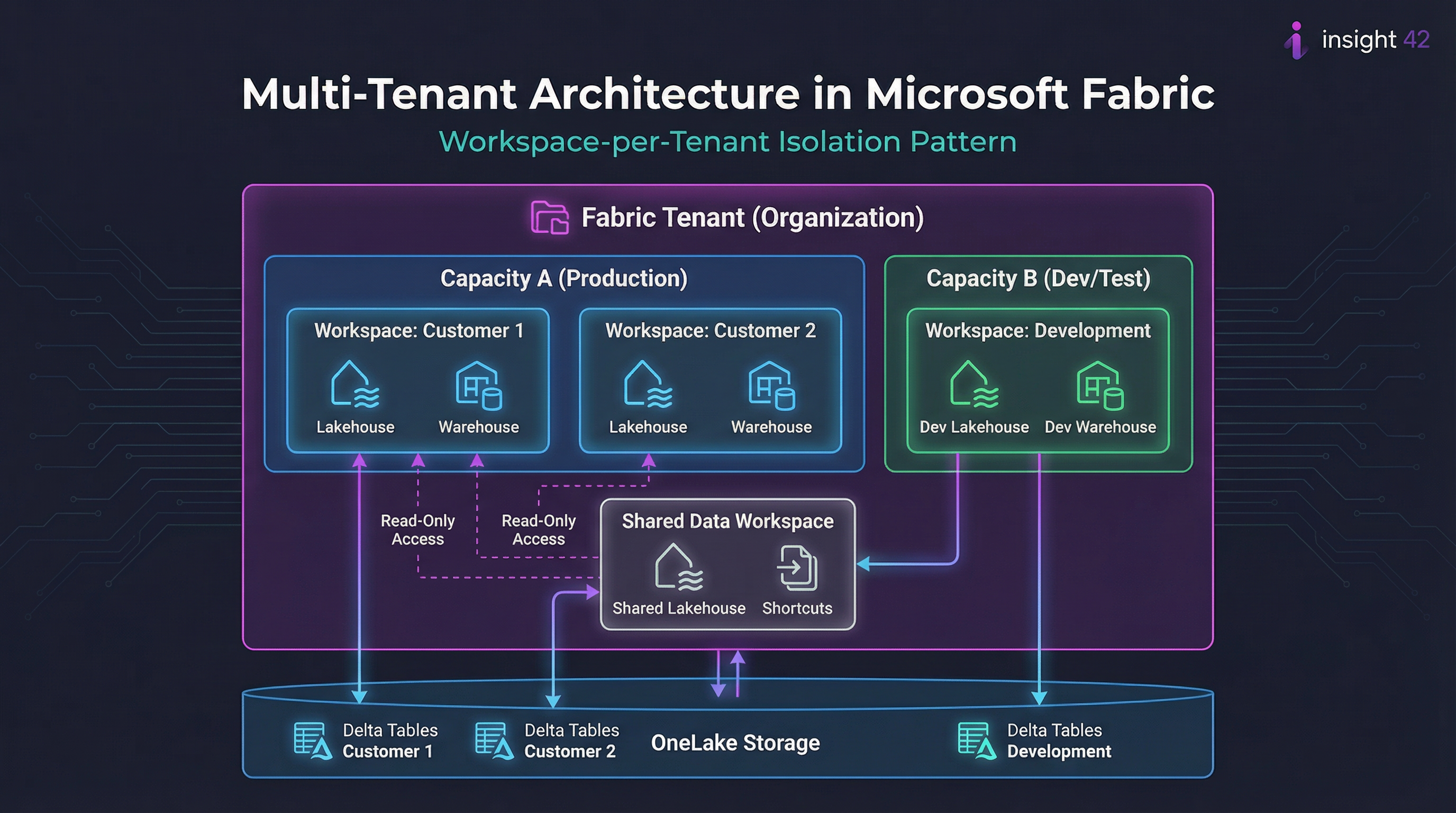
- Treat capacity as shared infrastructure: define which workloads get priority, and put guardrails around dev/test/prod usage.
AI & Copilot in Fabric: what it is (and how to adopt responsibly)
Copilot in Fabric introduces generative AI experiences to help transform/analyze data and create insights, visualizations, and reports; availability varies by experience and feature state (some are preview).
Adoption best practices:
- Enable it deliberately (not “turn it on everywhere”)
- Create usage guidelines (data privacy, human review, approved datasets)
- Start with low-risk scenarios (documentation, SQL drafts, exploration)
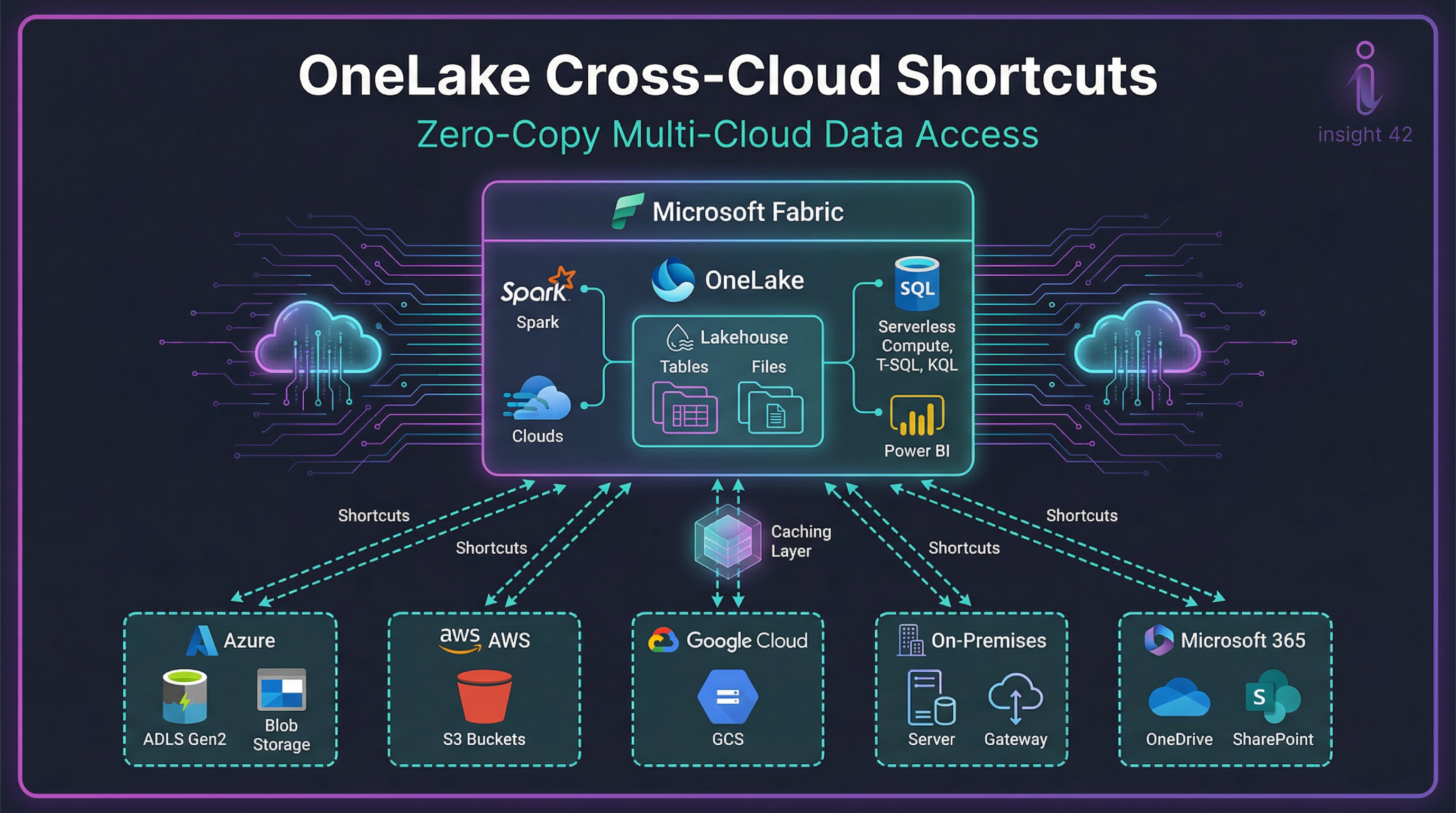
OneLake shortcuts: unify without copying (and why this changes migrations)
Shortcuts let you “virtualize” data across domains/clouds/accounts by making OneLake a single virtual data lake; Fabric engines can connect through a unified namespace, and OneLake manages permissions/credentials so you don’t have to configure each workload separately.
- You can reduce duplicate staging copies
- You can incrementally migrate legacy lakes/warehouses
- You can allow teams to keep data where it is (temporarily) while centralizing governance
A practical end-to-end rollout plan (discovery → pilot → production)
Phase 1 — 2–4 weeks: Discovery & platform blueprint
Deliverables:
- Target architecture (lakehouse/warehouse/real-time lanes)
- Workspace strategy and naming standards
- Security model (groups, roles, data access patterns)
- Governance model (ownership, certification, lineage expectations)
- Initial capacity sizing hypothesis
Phase 2 — 4–8 weeks: Pilot (“thin slice” end-to-end)
Pick one lighthouse use case and implement the full lifecycle:
- Ingest → bronze → silver → gold
- One governed semantic model and 2–3 business reports
- Data quality checks + monitoring
- Role-based access + audit-ready governance story
Success criteria (be explicit):
- Reduced manual steps
- Clear lineage and ownership
- Faster cycle time for new datasets
- A repeatable pattern others can copy
Phase 3 — 8–16 weeks: Production foundation
- Separate dev/test/prod workspaces (or clear release flows)
- CI/CD and deployment patterns (whatever your org standard is)
- Cost controls: capacity scheduling, workload prioritization, usage monitoring
- Network posture: Private Links and outbound rules if required
Phase 4 — Scale: domain rollout + self-service enablement
- Create “golden paths” (templates for pipelines, lakehouses, semantic models)
- Training by persona: analysts (Power BI + governance), engineers (lakehouse patterns, orchestration), ops/admins (security, capacity, monitoring)
- Establish a data product operating model (ownership, SLAs, versioning)
Common pitfalls (and how to avoid them)
1. Treating Fabric like “just a BI tool”
Fabric is a full analytics platform; plan governance, engineering standards, and an operating model from day one.
2. Not deciding Lakehouse vs Warehouse intentionally
Use Microsoft’s decision guidance and align by workload/persona.
3. Inconsistent security between workspaces and data
Define a single permission strategy and understand how Fabric’s permission layers interact.
4. Underestimating network requirements
If your org is private-network-first, plan Private Links and outbound restrictions early.
5. Capacity without FinOps
Capacity is shared—without guardrails, “noisy neighbor” problems appear fast. Establish policies, monitoring, and environment separation.
The “done right” Fabric checklist (copy/paste)
Strategy
☐ 3–5 lighthouse use cases with measurable outcomes
☐ Target architecture and workload mapping
☐ Capacity model + distribution/licensing plan
Platform foundation
☐ Workspace taxonomy and naming standards
☐ Dev/test/prod separation
☐ CI/CD or release process defined
Data architecture
☐ Bronze/Silver/Gold pattern defined
☐ Lakehouse vs Warehouse decisions documented
☐ Real-time lane (if needed) using Eventstreams/RTI
Security & governance
☐ Permission model documented (roles, items, compute, OneLake)
☐ OneLake security strategy (where applicable)
☐ Purview governance integration approach
☐ Network posture (Private Links / outbound rules) if required
Conclusion
Microsoft Fabric represents a significant shift in the data platform landscape. By unifying the entire analytics lifecycle, from data ingestion to business intelligence, Fabric has the potential to eliminate data sprawl, simplify governance, and empower organizations to make better, faster decisions. However, a successful Fabric adoption requires careful planning, a clear understanding of its core concepts, and a phased rollout approach. By following the best practices outlined in this guide, you can unlock the full potential of Microsoft Fabric and build a data platform that is both powerful and future-proof.
Call to Action
Ready to start your Microsoft Fabric journey? Contact us today for a free consultation and learn how we can help you design and implement a successful Fabric solution.
References
[1] What is Microsoft Fabric – Microsoft Fabric | Microsoft Learn: https://learn.microsoft.com/en-us/fabric/fundamentals/microsoft-fabric-overview
[2] OneLake, the OneDrive for data – Microsoft Fabric: https://learn.microsoft.com/en-us/fabric/onelake/onelake-overview
[3] Microsoft Fabric – Pricing | Microsoft Azure: https://azure.microsoft.com/en-us/pricing/details/microsoft-fabric/
[4] Governance and compliance in Microsoft Fabric: https://learn.microsoft.com/en-us/fabric/governance/governance-compliance-overview
[5] Permission model – Microsoft Fabric | Microsoft Learn: https://learn.microsoft.com/en-us/fabric/security/permission-model
[6] Microsoft Fabric decision guide: Choose between Warehouse and Lakehouse: https://learn.microsoft.com/en-us/fabric/fundamentals/decision-guide-lakehouse-warehouse
[7] What Is Fabric Data Warehouse? – Microsoft Fabric: https://learn.microsoft.com/en-us/fabric/data-warehouse/data-warehousing
[8] Real-Time Intelligence documentation in Microsoft Fabric: https://learn.microsoft.com/en-us/fabric/real-time-intelligence/
[9] Microsoft Fabric Eventstreams Overview: https://learn.microsoft.com/en-us/fabric/real-time-intelligence/event-streams/overview
[10] What is Fabric Activator? – Microsoft Fabric: https://learn.microsoft.com/en-us/fabric/real-time-intelligence/data-activator/activator-introduction
[11] Use Microsoft Purview to govern Microsoft Fabric: https://learn.microsoft.com/en-us/fabric/governance/microsoft-purview-fabric
[12] OneLake security overview – Microsoft Fabric: https://learn.microsoft.com/en-us/fabric/onelake/security/get-started-security
[13] About private Links for secure access to Fabric: https://learn.microsoft.com/en-us/fabric/security/security-private-links-overview
[14] Enable workspace outbound access protection: https://learn.microsoft.com/en-us/fabric/security/workspace-outbound-access-protection-set-up
[15] Overview of Copilot in Fabric – Microsoft Fabric: https://learn.microsoft.com/en-us/fabric/fundamentals/copilot-fabric-overview
[16] Unify data sources with OneLake shortcuts: https://learn.microsoft.com/en-us/fabric/onelake/onelake-shortcuts
MicrosoftFabric #OneLake #PowerBI #DataPlatform #DataAnalytics #AnalyticsPlatform #Lakehouse #DataWarehouse #DataEngineering #DataIntegration #DataFactory #DataPipelines #ETL #ELT #RealTimeIntelligence #RealTimeAnalytics #Eventstreams #StreamingAnalytics #DataGovernance #MicrosoftPurview #DataLineage #DataSecurity #RBAC #EntraID #Compliance #FinOps #CapacityPlanning #DataQuality #CloudAnalytics #DataModernization