Meta Description: Sovereign Cloud Germany: What does digital sovereignty mean for public authorities? Data residency, key management, and BSI C5 compliance.
What Does Digital Sovereignty Mean?
Digital sovereignty is the ability to control one’s own IT infrastructure and data with self-determination. For the public sector, this is not a luxury but a necessity. It is about controlling citizen data, independence from individual providers, and compliance with German and European legal norms (GDPR, Schrems II).
A sovereign cloud in Germany provides the technical and organizational framework to ensure this control. It combines the innovative power of global hyperscalers (like Azure and GCP) with the strict requirements of German and European law.
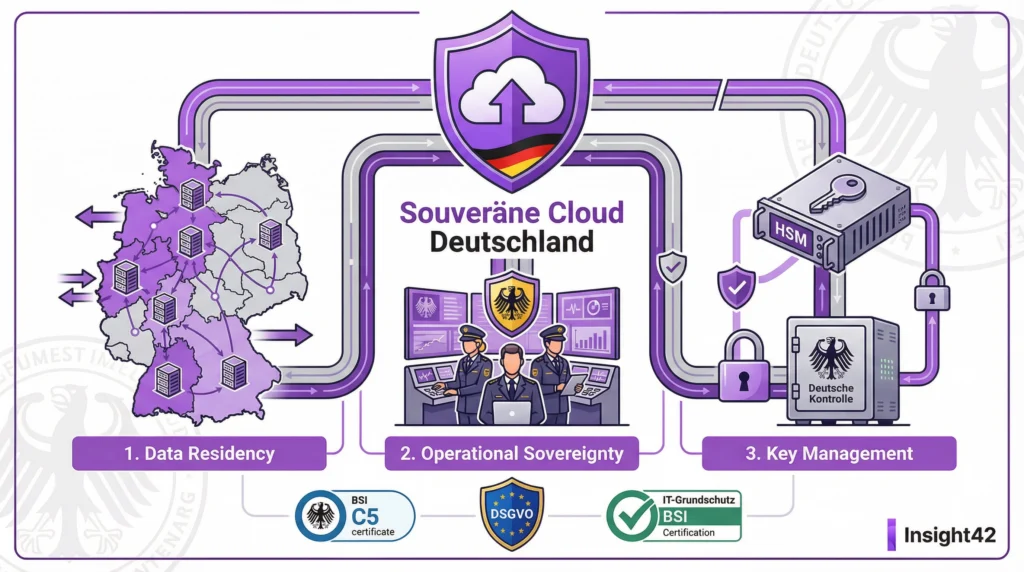
The Three Pillars of Digital Sovereignty
1. Data Residency
What it is: The guarantee that data and metadata are stored and processed exclusively within a defined geographical area (e.g., Germany).
Why it matters: Prevents access by foreign authorities based on laws like the US CLOUD Act. Ensures compliance with GDPR.
Implementation: Use of cloud regions in Germany (e.g., Frankfurt, Berlin). Contractual assurances from the provider.
2. Control & Transparency
What it is: The ability to seamlessly control and log access to data and systems, including access by the cloud provider itself.
Why it matters: Creates trust. Enables proof of compliance (BSI C5, GDPR).
Implementation: Strict access controls (Zero Trust, MFA), comprehensive logging, use of external control bodies (e.g., data trustees).
3. Key Management
What it is: Control over the cryptographic keys used to encrypt data. Whoever holds the key, controls the data.
Why it matters: It is the ultimate lever for data sovereignty. Even if a provider could access the encrypted data, they cannot read it without the key.
Implementation: Bring Your Own Key (BYOK) or Hold Your Own Key (HYOK), where the keys remain within your own infrastructure.
Quick Checklist: Digital Sovereignty
Pillar
Key Question
Implemented?
Data Residency
Is all data guaranteed to be in Germany/EU?
☐
Control
Do we have full control over all access?
☐
Transparency
Is all access logged completely?
☐
Key Management
Do we control the cryptographic keys?
☐
Compliance
Are the requirements of GDPR, BSI C5, etc., met?
☐
To-Do List for a Sovereign Cloud Strategy
Immediately: Classify the protection needs of the data.
Week 1: Define the requirements for digital sovereignty.
Week 2: Evaluate the market for sovereign cloud offerings (e.g., Azure, GCP, T-Systems Sovereign Cloud).
Month 1: Establish a strategy for data residency and key management.
Month 2: Adapt the BSI-compliant cloud security concept accordingly.
Month 3: Start a pilot project in a sovereign cloud environment.
Sovereign Offerings from Hyperscalers
The major providers have recognized the need and offer special solutions:
Microsoft Cloud for Sovereignty: Offers data residency, enhanced controls, and transparency. Partners like T-Systems provide additional data trustee models.
Google Cloud Sovereign Solutions: Provides similar guarantees for data location and control, often in partnership with local providers.
These offerings are an important step but require careful examination. Cloud consulting for public authorities helps to validate the providers’ promises and find the right solution for your needs.
The Role of BSI C5 and IT Baseline Protection
Digital sovereignty and compliance go hand in hand. Being BSI C5 compliant is a basic requirement for a sovereign cloud. The controls in the C5 catalog cover many aspects of sovereignty, especially in the areas of transparency and operational security.
IT Baseline Protection consulting helps to integrate the BSI’s requirements into the cloud architecture. An ISO 27001 certification based on IT Baseline Protection demonstrates the effectiveness of the implemented measures.
Insight42: Your Guide to Digital Sovereignty
The path to a sovereign cloud is complex. We navigate you safely through the technological, legal, and organizational challenges. We know the offerings, the pitfalls, and the success factors.
We help you develop a strategy tailored to your specific protection needs—from data residency to external key management. Secure, BSI C5 compliant, and future-proof.
Take control. Contact us.
Figure: The Three Pillars of Digital Sovereignty in the Cloud
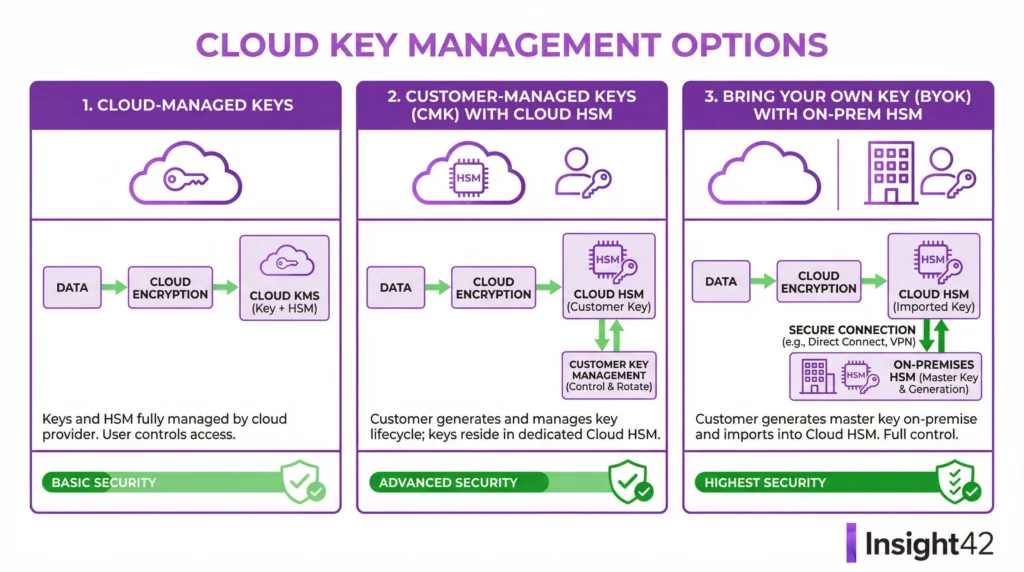
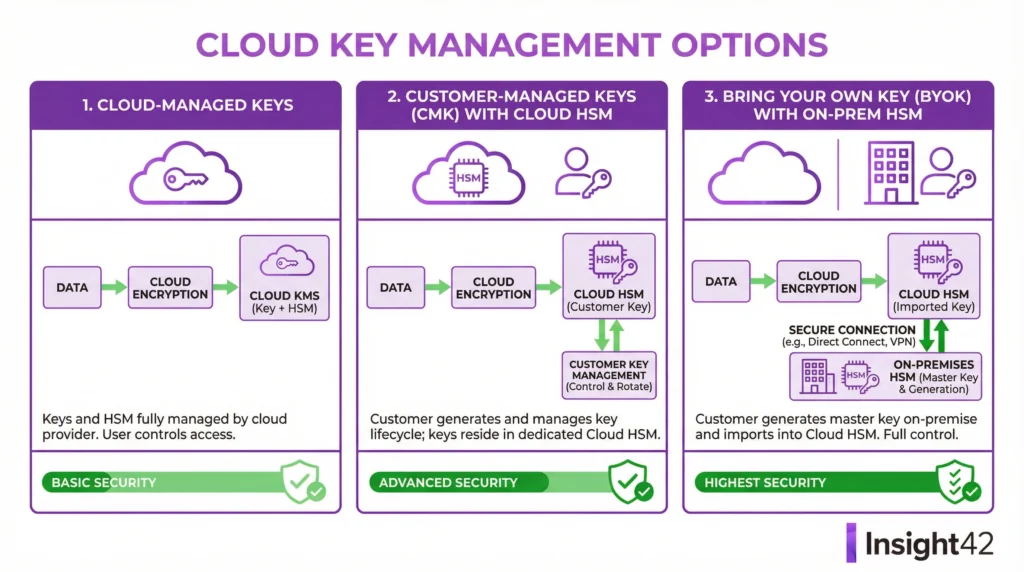
Blog Post 2: Cloud Key Management – BYOK vs. HYOK in Azure and GCP
Meta Description: Cloud Key Management: The ultimate lever for data sovereignty. A comparison of BYOK (Bring Your Own Key) and HYOK (Hold Your Own Key) in Azure and GCP.
Whoever Holds the Key, Holds the Power
Encryption is the foundation of cloud security. But who controls the keys? By default, the cloud provider does. This is convenient, but often not sufficient for sensitive government data. Because whoever controls the key can decrypt the data. This includes the provider itself and potentially foreign authorities.
The solution: Take control of your keys yourself. The two most important models for this are Bring Your Own Key (BYOK) and Hold Your Own Key (HYOK).
Bring Your Own Key (BYOK)
The Principle: You create your keys in your own environment (e.g., with an on-premises Hardware Security Module – HSM) and securely import them into the cloud provider’s key management system (e.g., Azure Key Vault, GCP Cloud KMS).
Advantages:
Full control over the creation and lifecycle of the key.
The key can be revoked (deleted) at any time, rendering the data unusable.
Relatively simple integration with most cloud services.
Disadvantages:
The key is physically located in the provider’s cloud. Access by the provider, though unlikely, is not 100% technically impossible.
Hold Your Own Key (HYOK) / External Key Management
The Principle: The key never leaves your own controlled environment. The cloud services send the data to be encrypted or decrypted to your external key manager. The key itself is never transferred.
Advantages:
Maximum control and sovereignty. The key is physically and logically separate from the cloud.
Access by the cloud provider or third parties is technically impossible.
Disadvantages:
Higher complexity and potentially higher latency.
Requires a highly available own key management infrastructure.
External key management is not an isolated topic. It must be integrated into the overall BSI-compliant cloud security concept. It is a central measure for meeting the requirements of BSI C5, IT Baseline Protection, and GDPR.
The processes surrounding key management must be clearly defined and documented. Who can create keys? Who approves their use? What happens in an emergency? IT Baseline Protection consulting helps to design these processes robustly.
Insight42: Experts in Cloud Key Management
We help you regain control over your keys and thus your data. We analyze your needs, compare the solutions, and implement the model that is right for you.
Whether it’s BYOK with Azure Key Vault or HYOK with external HSMs – we have the expertise to technically implement your sovereign cloud strategy. Secure, compliant, and manageable.
Lock your data securely. Talk to us.
Figure: Comparison of Key Management Models BYOK and HYOK
Data Protection Impact Assessment (DPIA) for the Cloud
Resilience, SECURITY 23rd Feb 2026Sutirtha
A Guide for Public Authorities
Meta Description: A guide to Data Protection Impact Assessments (DPIAs) for cloud projects in the public sector. GDPR-compliant, secure, and practical.
Why a DPIA is Mandatory for Cloud Projects
The cloud offers enormous opportunities, but it also poses risks to data protection. The General Data Protection Regulation (GDPR) therefore requires a Data Protection Impact Assessment (DPIA) when there is a high risk to the rights and freedoms of natural persons. For the public sector, which works with sensitive citizen data, this is almost always the case for cloud projects.
A DPIA is not an obstacle; it is a tool for risk minimization. It forces a systematic engagement with data protection and creates legal certainty for your cloud project. A missing DPIA can lead to significant fines and the halting of the project.
When Exactly is a DPIA Required?
Article 35 of the GDPR is clear. A DPIA is required, in particular, for:
Large-scale processing of special categories of data (e.g., health data).
Systematic and extensive evaluation of personal aspects (profiling).
Large-scale monitoring of publicly accessible areas.
The German Data Protection Conference (DSK) has published a positive list of processing activities for which a DPIA is generally required. The use of cloud services for specialized procedures with large amounts of data often falls into this category.
The 4 Steps of a Data Protection Impact Assessment
A DPIA follows a structured process. It is not a one-time document but a living process.
Step 1: Systematic Description
What? What data is being processed?
Why? What is the purpose of the processing?
Who? Who are the parties involved (controller, processor)?
How? What technologies and processes are being used?
Step 2: Assessment of Necessity and Proportionality
Is the processing truly necessary for the purpose? Are there milder, more data-minimizing alternatives? The legal basis must be clear.
Step 3: Risk Assessment
What are the risks to the data subjects (citizens)? (e.g., unauthorized access, data loss, discrimination). The likelihood of occurrence and the severity of the potential harm are assessed.
Step 4: Remedial Measures
What technical and organizational measures (TOMs) will be taken to minimize the risks? This includes encryption, access controls, and contractual arrangements with the cloud provider.
Quick Checklist: DPIA for the Cloud
Step
Key Question
Done?
1. Description
Is the processing completely described?
☐
2. Necessity
Is the legal basis clear and the processing proportionate?
☐
3. Risk Assessment
Are the risks to data subjects identified and assessed?
☐
4. Measures
Are effective remedial measures defined?
☐
5. Documentation
Is the entire DPIA comprehensibly documented?
☐
6. Consultation
Must the Data Protection Officer or the supervisory authority be consulted?
☐
To-Do List for the DPIA
Immediately: Clarify whether a DPIA is mandatory for the cloud project.
Week 1: Appoint a responsible team for the DPIA.
Week 2: Involve the Data Protection Officer at an early stage.
Month 1: Begin the systematic description of the processing.
Month 2: Conduct the risk assessment.
Month 3: Define remedial measures with the cloud service provider and the IT security team.
Ongoing: Update the DPIA whenever the system changes.
The Challenge: Third-Country Transfers
Since the Schrems II ruling, data transfers to the US and other third countries have become complex. Cloud providers like Microsoft (Azure) and Google (GCP) are US companies. A DPIA must explicitly assess this risk.
Remedial measures for this include:
Standard Contractual Clauses (SCCs): The standard mechanism, but often not sufficient on its own.
Additional TOMs: Strong encryption (ideally with your own keys – BYOK/HYOK), pseudonymization, anonymization.
Sovereign Cloud Options: Use of data centers in Germany/EU and contractual assurances (e.g., sovereign cloud Germany).
Insight42: Your Partner for the Cloud DPIA
A DPIA for cloud services requires legal, technical, and procedural knowledge. We connect these worlds. Our Data Protection Impact Assessment consulting is practice-oriented and tailored to the public sector.
We help you identify risks, define effective measures, and design your cloud projects to be legally compliant, in line with BSI C5 and IT Baseline Protection.
Make your data protection future-proof. Contact us.
Figure: The 4-Step Process of a Data Protection Impact Assessment for the Cloud
Blog Post 2: GDPR-Compliant Cloud Usage – TOMs in Azure and GCP
Meta Description: Implementation of Technical and Organizational Measures (TOMs) according to GDPR in Azure and GCP. Practical examples for public authorities.
From Requirement to Technology
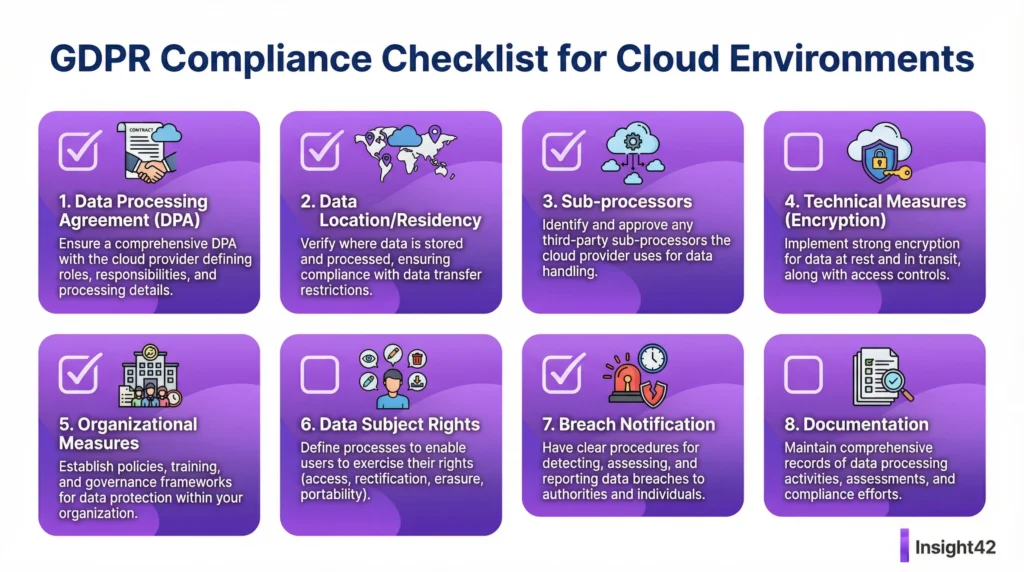
Article 32 of the GDPR calls for “appropriate technical and organizational measures” (TOMs) to ensure a level of security appropriate to the risk. But what does this mean in practice in the cloud? How do you translate legal requirements into technical configurations in Azure or GCP?
This article shows how to practically implement the abstract requirements of the GDPR using the native tools of the major cloud platforms. The cloud provider only supplies the tools; the authority, as the controller, is responsible for their correct use.
Mapping GDPR Requirements to Cloud Services
1. Pseudonymization and Encryption (Art. 32(1)(a))
Goal: Make data unreadable to unauthorized persons.
Azure:
Encryption at Rest: Transparent Data Encryption (TDE) for databases, Storage Service Encryption for storage accounts.
Encryption in Transit: Enforce TLS 1.2+ for all connections.
Key Management: Azure Key Vault for secure storage and management of keys (Bring Your Own Key – BYOK possible).
GCP:
Encryption at Rest: Enabled by default for all services.
Encryption in Transit: Default for all connections.
Key Management: Cloud Key Management Service (Cloud KMS), also with a BYOK option.
2. Confidentiality and Integrity (Art. 32(1)(b))
Goal: Ensure that only authorized persons can access data and that it cannot be altered unnoticed.
Azure:
Access Control: Entra ID with Conditional Access and MFA, Privileged Identity Management (PIM) for admin rights.
Network Security: Network Security Groups (NSGs) and Azure Firewall for segmentation.
GCP:
Access Control: Cloud IAM with Conditions, Identity-Aware Proxy (IAP) for Zero Trust access.
Network Security: VPC Firewall Rules and Cloud Armor.
3. Availability and Resilience (Art. 32(1)(b))
Goal: Ensure that systems function even in the event of disruptions or attacks.
Azure:
High Availability: Use of Availability Zones and Availability Sets.
Scalability: Virtual Machine Scale Sets, App Service Plans.
GCP:
High Availability: Distribution of instances across multiple zones.
Scalability: Managed Instance Groups (MIGs).
4. Recoverability (Art. 32(1)(c))
Goal: Be able to quickly restore data and systems after an incident.
Azure: Azure Backup for backing up VMs, databases, and file shares. Azure Site Recovery for disaster recovery.
GCP: Backup and DR Service, Snapshots for Persistent Disks.
5. Regular Testing and Evaluation (Art. 32(1)(d))
Goal: Continuously verify the effectiveness of the TOMs.
Azure: Microsoft Defender for Cloud for monitoring security configuration and detecting threats. Azure Policy for enforcing compliance rules.
GCP: Security Command Center for centralized vulnerability and compliance management.
Quick Checklist: Important TOMs in the Cloud
TOM Category
Measure
Implemented?
Encryption
Data-at-Rest & Data-in-Transit fully active
☐
Access
MFA for all administrative and privileged accounts
☐
Network
Strict segmentation and firewall rules
☐
Backup
Regular, tested backups of all critical systems
☐
Monitoring
Continuous monitoring of security configuration
☐
Patching
Timely application of security updates
☐
TOMs as Part of the Security Concept
The defined TOMs are a central component of the security concept according to BSI C5 or IT Baseline Protection. They demonstrate how information security objectives are technically implemented. Good documentation of the TOMs is therefore essential not only for GDPR but also for audits according to BSI C5 or ISO 27001.
Cloud consulting for public authorities helps to select and implement the right TOMs for your specific requirements. It is not about doing everything that is technically possible, but what is appropriate for the risk.
Insight42: We Make Your Cloud GDPR-Compliant
We translate the GDPR into the language of the cloud. We configure Azure and GCP to meet the requirements for technical and organizational measures—securely, documented, and auditable.
Our Managed Cloud Operations include the continuous monitoring and optimization of your TOMs. This ensures that your data protection level remains high even as threats and technologies change.
Implement data protection technically. Talk to us.
Figure: Technical and Organizational Measures (TOMs) according to GDPR in the Cloud
data protection impact assessment cloud, gdpr cloud, technical and organisational measures, toms gdpr, public sector cloud migration, bsi c5 compliant, it baseline protection consulting, sovereign cloud germany, azure data protection, gcp data protection, schrems ii, third country transfer, cloud consulting for authorities, bsi cloud security concept, data security, data protection compliant, data processing agreement, dpa cloud
“))oxiaomi.file(action = “write”, brief = “Translate the seventh blog post file into English”, path = “/home/ubuntu/insight42_blogs/final_docs/en/07_gdpr_dsfa_dpia.md”, text = “# Topic 7: GDPR + DPIA for cloud workloads
Blog Post 1: Data Protection Impact Assessment (DPIA) for the Cloud – A Guide for Public Authorities
Meta Description: A guide to Data Protection Impact Assessments (DPIAs) for cloud projects in the public sector. GDPR-compliant, secure, and practical.
Why a DPIA is Mandatory for Cloud Projects
The cloud offers enormous opportunities, but it also poses risks to data protection. The General Data Protection Regulation (GDPR) therefore requires a Data Protection Impact Assessment (DPIA) when there is a high risk to the rights and freedoms of natural persons. For the public sector, which works with sensitive citizen data, this is almost always the case for cloud projects.
A DPIA is not an obstacle; it is a tool for risk minimization. It forces a systematic engagement with data protection and creates legal certainty for your cloud project. A missing DPIA can lead to significant fines and the halting of the project.
When Exactly is a DPIA Required?
Article 35 of the GDPR is clear. A DPIA is required, in particular, for:
Large-scale processing of special categories of data (e.g., health data).
Systematic and extensive evaluation of personal aspects (profiling).
Large-scale monitoring of publicly accessible areas.
The German Data Protection Conference (DSK) has published a positive list of processing activities for which a DPIA is generally required. The use of cloud services for specialized procedures with large amounts of data often falls into this category.
The 4 Steps of a Data Protection Impact Assessment
A DPIA follows a structured process. It is not a one-time document but a living process.
Step 1: Systematic Description
What? What data is being processed?
Why? What is the purpose of the processing?
Who? Who are the parties involved (controller, processor)?
How? What technologies and processes are being used?
Step 2: Assessment of Necessity and Proportionality
Is the processing truly necessary for the purpose? Are there milder, more data-minimizing alternatives? The legal basis must be clear.
Step 3: Risk Assessment
What are the risks to the data subjects (citizens)? (e.g., unauthorized access, data loss, discrimination). The likelihood of occurrence and the severity of the potential harm are assessed.
Step 4: Remedial Measures
What technical and organizational measures (TOMs) will be taken to minimize the risks? This includes encryption, access controls, and contractual arrangements with the cloud provider.
Quick Checklist: DPIA for the Cloud
Step
Key Question
Done?
1. Description
Is the processing completely described?
☐
2. Necessity
Is the legal basis clear and the processing proportionate?
☐
3. Risk Assessment
Are the risks to data subjects identified and assessed?
☐
4. Measures
Are effective remedial measures defined?
☐
5. Documentation
Is the entire DPIA comprehensibly documented?
☐
6. Consultation
Must the Data Protection Officer or the supervisory authority be consulted?
☐
To-Do List for the DPIA
Immediately: Clarify whether a DPIA is mandatory for the cloud project.
Week 1: Appoint a responsible team for the DPIA.
Week 2: Involve the Data Protection Officer at an early stage.
Month 1: Begin the systematic description of the processing.
Month 2: Conduct the risk assessment.
Month 3: Define remedial measures with the cloud service provider and the IT security team.
Ongoing: Update the DPIA whenever the system changes.
The Challenge: Third-Country Transfers
Since the Schrems II ruling, data transfers to the US and other third countries have become complex. Cloud providers like Microsoft (Azure) and Google (GCP) are US companies. A DPIA must explicitly assess this risk.
Remedial measures for this include:
Standard Contractual Clauses (SCCs): The standard mechanism, but often not sufficient on its own.
Additional TOMs: Strong encryption (ideally with your own keys – BYOK/HYOK), pseudonymization, anonymization.
Sovereign Cloud Options: Use of data centers in Germany/EU and contractual assurances (e.g., sovereign cloud Germany).
Insight42: Your Partner for the Cloud DPIA
A DPIA for cloud services requires legal, technical, and procedural knowledge. We connect these worlds. Our Data Protection Impact Assessment consulting is practice-oriented and tailored to the public sector.
We help you identify risks, define effective measures, and design your cloud projects to be legally compliant, in line with BSI C5 and IT Baseline Protection.
Make your data protection future-proof. Contact us.
Figure: The 4-Step Process of a Data Protection Impact Assessment for the Cloud
Blog Post 2: GDPR-Compliant Cloud Usage – TOMs in Azure and GCP
Meta Description: Implementation of Technical and Organizational Measures (TOMs) according to GDPR in Azure and GCP. Practical examples for public authorities.
From Requirement to Technology
Article 32 of the GDPR calls for “appropriate technical and organizational measures” (TOMs) to ensure a level of security appropriate to the risk. But what does this mean in practice in the cloud? How do you translate legal requirements into technical configurations in Azure or GCP?
This article shows how to practically implement the abstract requirements of the GDPR using the native tools of the major cloud platforms. The cloud provider only supplies the tools; the authority, as the controller, is responsible for their correct use.
Mapping GDPR Requirements to Cloud Services
1. Pseudonymization and Encryption (Art. 32(1)(a))
Goal: Make data unreadable to unauthorized persons.
Azure:
Encryption at Rest: Transparent Data Encryption (TDE) for databases, Storage Service Encryption for storage accounts.
Encryption in Transit: Enforce TLS 1.2+ for all connections.
Key Management: Azure Key Vault for secure storage and management of keys (Bring Your Own Key – BYOK possible).
GCP:
Encryption at Rest: Enabled by default for all services.
Encryption in Transit: Default for all connections.
Key Management: Cloud Key Management Service (Cloud KMS), also with a BYOK option.
2. Confidentiality and Integrity (Art. 32(1)(b))
Goal: Ensure that only authorized persons can access data and that it cannot be altered unnoticed.
Azure:
Access Control: Entra ID with Conditional Access and MFA, Privileged Identity Management (PIM) for admin rights.
Network Security: Network Security Groups (NSGs) and Azure Firewall for segmentation.
GCP:
Access Control: Cloud IAM with Conditions, Identity-Aware Proxy (IAP) for Zero Trust access.
Network Security: VPC Firewall Rules and Cloud Armor.
3. Availability and Resilience (Art. 32(1)(b))
Goal: Ensure that systems function even in the event of disruptions or attacks.
Azure:
High Availability: Use of Availability Zones and Availability Sets.
Scalability: Virtual Machine Scale Sets, App Service Plans.
GCP:
High Availability: Distribution of instances across multiple zones.
Scalability: Managed Instance Groups (MIGs).
4. Recoverability (Art. 32(1)(c))
Goal: Be able to quickly restore data and systems after an incident.
Azure: Azure Backup for backing up VMs, databases, and file shares. Azure Site Recovery for disaster recovery.
GCP: Backup and DR Service, Snapshots for Persistent Disks.
5. Regular Testing and Evaluation (Art. 32(1)(d))
Goal: Continuously verify the effectiveness of the TOMs.
Azure: Microsoft Defender for Cloud for monitoring security configuration and detecting threats. Azure Policy for enforcing compliance rules.
GCP: Security Command Center for centralized vulnerability and compliance management.
Quick Checklist: Important TOMs in the Cloud
TOM Category
Measure
Implemented?
Encryption
Data-at-Rest & Data-in-Transit fully active
☐
Access
MFA for all administrative and privileged accounts
☐
Network
Strict segmentation and firewall rules
☐
Backup
Regular, tested backups of all critical systems
☐
Monitoring
Continuous monitoring of security configuration
☐
Patching
Timely application of security updates
☐
TOMs as Part of the Security Concept
The defined TOMs are a central component of the security concept according to BSI C5 or IT Baseline Protection. They demonstrate how information security objectives are technically implemented. Good documentation of the TOMs is therefore essential not only for GDPR but also for audits according to BSI C5 or ISO 27001.
Cloud consulting for public authorities helps to select and implement the right TOMs for your specific requirements. It is not about doing everything that is technically possible, but what is appropriate for the risk.
Insight42: We Make Your Cloud GDPR-Compliant
We translate the GDPR into the language of the cloud. We configure Azure and GCP to meet the requirements for technical and organizational measures—securely, documented, and auditable.
Our Managed Cloud Operations include the continuous monitoring and optimization of your TOMs. This ensures that your data protection level remains high even as threats and technologies change.
Implement data protection technically. Talk to us.
Figure: Technical and Organizational Measures (TOMs) according to GDPR in the Cloud
AI In The Public Sector, Microsoft Fabric:, Sovereignty Series 16th Jan 2026Martin-Peter Lambert
A complete walkthrough of architecture, governance, security, and best practices for building a unified data platform.
A unified data platform concept for Microsoft Fabric.
Meta title (SEO): Microsoft Fabric Definitive Guide (2026): OneLake, Security, Governance, Architecture & Best Practices
Meta description: The most practical, end-to-end guide to Microsoft Fabric for business and technical leaders. Learn how to unify data engineering, warehousing, real-time analytics, data science, and BI on OneLake.
Primary keywords: Microsoft Fabric, OneLake, Lakehouse, Data Warehouse, Real-Time Intelligence, Power BI, Microsoft Purview, Fabric security, Fabric capacity, data platform architecture, data sprawl, medallion architecture
Key Takeaways
Microsoft Fabric is a unified analytics platform that aims to solve the problem of data platform sprawl by integrating various data services into a single SaaS offering.
OneLake is the centerpiece of Fabric, acting as a single, logical data lake for the entire organization, similar to OneDrive for data.
Fabric offers different “experiences” for various roles, such as data engineering, data science, and business intelligence, all built on a shared foundation.
The platform uses a capacity-based pricing model, which allows for scalable and predictable costs.
Security and governance are built-in, with features like Microsoft Purview integration, fine-grained access controls, and private links.
A well-defined rollout plan is crucial for a successful Fabric adoption, starting with a discovery phase, followed by a pilot, and then a full production rollout.
Who is this guide for?
This guide is for business and technical leaders who are evaluating or implementing Microsoft Fabric. It provides a comprehensive overview of the platform, from its core concepts to a practical rollout plan. Whether you are a CIO, a data architect, or a BI manager, this guide will help you understand how to leverage Fabric to build a modern, scalable, and secure data platform.
Why Microsoft Fabric exists (in plain language)
Most organizations don’t have a “data problem”—they have a data platform sprawl problem:
Multiple tools for ingestion, transformation, and reporting
Duplicate data copies across lakes/warehouses/marts
Inconsistent security rules between engines
A governance gap (lineage, classification, ownership)
Cost surprises when teams scale
Microsoft Fabric was designed to reduce that sprawl by delivering an end-to-end analytics platform as a SaaS service: ingestion → transformation → storage → real-time → science → BI, all integrated.
If your goal is a platform that business teams can trust and technical teams can scale, Fabric is fundamentally about unification: common storage, integrated experiences, shared governance, and a capacity model you can manage centrally.
What is Microsoft Fabric? (the one-paragraph definition)
Microsoft Fabric is an analytics platform that supports end-to-end data workflows—data ingestion, transformation, real-time processing, analytics, and reporting—through integrated experiences such as Data Engineering, Data Factory, Data Science, Real-Time Intelligence, Data Warehouse, Databases, and Power BI, operating over a shared compute and storage model with OneLake as the centralized data lake.
The Fabric mental model: the 6 building blocks that matter
1) OneLake = the “OneDrive for data”
OneLake is Fabric’s single logical data lake. Fabric stores items like lakehouses and warehouses in OneLake, similar to how Office stores files in OneDrive. Under the hood, OneLake is built on ADLS Gen2 concepts and supports many file types.
OneLake acts as a single, logical data lake for the entire organization.
Why this matters: OneLake is the anchor that makes “one platform” real—shared storage, consistent access patterns, fewer duplicate copies.
2) Experiences (workloads) = role-based tools on the same foundation
Fabric exposes different “experiences” depending on what you’re doing—engineering, integration, warehousing, real-time, BI—without making you stitch together separate products.
3) Items = the concrete things teams build
In Fabric, you build “items” inside workspaces (think: lakehouse, warehouse, pipelines, notebooks, eventstreams, dashboards, semantic models). OneLake stores the data behind these items.
4) Capacity = the knob you scale (and govern)
Fabric uses a capacity-based model (F SKUs). You can scale up/down dynamically and even pause capacity (pay-as-you-go model).
5) Governance = make it discoverable, trusted, compliant
Fabric includes governance and compliance capabilities to manage and protect your data estate, improve discoverability, and meet regulatory requirements.
6) Security = consistent controls across engines
Fabric has a layered permission model (workspace roles, item permissions, compute permissions, and data-plane controls like OneLake security).
Choosing the right storage: Lakehouse vs Warehouse vs “other”
This is where many Fabric projects either become elegant—or messy.
A visual comparison of the flexible Lakehouse and the structured Data Warehouse.
Lakehouse (best when you want flexibility + Spark + open lake patterns)
Use a Lakehouse when:
You’re doing heavy data engineering and transformations
You want medallion patterns (bronze/silver/gold)
You’ll mix structured + semi-structured data
You want Spark-native developer workflows
Warehouse (best when you want SQL-first analytics and managed warehousing)
Fabric Data Warehouse is positioned as a “lake warehouse” with two warehousing items (warehouse item + SQL analytics endpoint) and includes replication to OneLake files for external access.
Real-Time Intelligence (best for streaming events, telemetry, “data in motion”)
Real-Time Intelligence is an end-to-end solution for event-driven scenarios—handling ingestion, transformation, storage, analytics, visualization, and real-time actions.
Eventstreams can ingest and route events without code and can expose Kafka endpoints for Kafka protocol connectivity.
Discovery: how to decide if Fabric is the right platform (business + technical)
Step 1 — Identify 3–5 “lighthouse” use cases
Pick use cases that prove the platform across the lifecycle:
Executive BI: certified metrics + governed semantic model
OneLake security enables granular, role-based security on data stored in OneLake and is designed to be enforced consistently across Fabric compute engines (not per engine). It is currently in preview.
If your organization needs tighter network posture:
Fabric supports Private Links at tenant and workspace levels, routing traffic through Microsoft’s private backbone.
You can enable workspace outbound access protection to block outbound connections by default, then allow only approved external connections (managed private endpoints or rules).
Governance & compliance capabilities
Fabric provides governance/compliance features to manage, protect, monitor, and improve discoverability of sensitive information.
A “good default” governance model:
Standard workspace taxonomy (by domain/product, not by team names)
Defined data owners + stewards
Certified datasets + endorsed metrics
Mandatory sensitivity labels for curated/gold assets (where applicable)
Capacity & licensing: the essentials (what leaders actually need to know)
Fabric uses capacity SKUs and also has important Power BI licensing implications.
Key official points from Microsoft’s pricing documentation:
Fabric capacity can be scaled up/down and paused (pay-as-you-go approach).
Power BI Pro licensing requirements extend to Fabric capacity for publishing/consuming Power BI content; however, with F64 (Premium P1 equivalent) or larger, report consumers may not require Pro licenses (per Microsoft’s licensing guidance).
How to translate this into planning decisions:
If your strategy includes broad internal distribution of BI content, licensing and capacity sizing should be evaluated together—not separately.
Treat capacity as shared infrastructure: define which workloads get priority, and put guardrails around dev/test/prod usage.
AI & Copilot in Fabric: what it is (and how to adopt responsibly)
Copilot in Fabric introduces generative AI experiences to help transform/analyze data and create insights, visualizations, and reports; availability varies by experience and feature state (some are preview).
Adoption best practices:
Enable it deliberately (not “turn it on everywhere”)
Create usage guidelines (data privacy, human review, approved datasets)
Start with low-risk scenarios (documentation, SQL drafts, exploration)
OneLake shortcuts: unify without copying (and why this changes migrations)
Shortcuts let you “virtualize” data across domains/clouds/accounts by making OneLake a single virtual data lake; Fabric engines can connect through a unified namespace, and OneLake manages permissions/credentials so you don’t have to configure each workload separately.
You can reduce duplicate staging copies
You can incrementally migrate legacy lakes/warehouses
You can allow teams to keep data where it is (temporarily) while centralizing governance
A practical end-to-end rollout plan (discovery → pilot → production)
Create “golden paths” (templates for pipelines, lakehouses, semantic models)
Training by persona: analysts (Power BI + governance), engineers (lakehouse patterns, orchestration), ops/admins (security, capacity, monitoring)
Establish a data product operating model (ownership, SLAs, versioning)
Common pitfalls (and how to avoid them)
1. Treating Fabric like “just a BI tool”
Fabric is a full analytics platform; plan governance, engineering standards, and an operating model from day one.
2. Not deciding Lakehouse vs Warehouse intentionally
Use Microsoft’s decision guidance and align by workload/persona.
3. Inconsistent security between workspaces and data
Define a single permission strategy and understand how Fabric’s permission layers interact.
4. Underestimating network requirements
If your org is private-network-first, plan Private Links and outbound restrictions early.
5. Capacity without FinOps
Capacity is shared—without guardrails, “noisy neighbor” problems appear fast. Establish policies, monitoring, and environment separation.
The “done right” Fabric checklist (copy/paste)
Strategy
☐ 3–5 lighthouse use cases with measurable outcomes
☐ Target architecture and workload mapping
☐ Capacity model + distribution/licensing plan
Platform foundation
☐ Workspace taxonomy and naming standards
☐ Dev/test/prod separation
☐ CI/CD or release process defined
Data architecture
☐ Bronze/Silver/Gold pattern defined
☐ Lakehouse vs Warehouse decisions documented
☐ Real-time lane (if needed) using Eventstreams/RTI
Security & governance
☐ Permission model documented (roles, items, compute, OneLake)
☐ OneLake security strategy (where applicable)
☐ Purview governance integration approach
☐ Network posture (Private Links / outbound rules) if required
Conclusion
Microsoft Fabric represents a significant shift in the data platform landscape. By unifying the entire analytics lifecycle, from data ingestion to business intelligence, Fabric has the potential to eliminate data sprawl, simplify governance, and empower organizations to make better, faster decisions. However, a successful Fabric adoption requires careful planning, a clear understanding of its core concepts, and a phased rollout approach. By following the best practices outlined in this guide, you can unlock the full potential of Microsoft Fabric and build a data platform that is both powerful and future-proof.
Call to Action
Ready to start your Microsoft Fabric journey? Contact us today for a free consultation and learn how we can help you design and implement a successful Fabric solution.
References
[1] What is Microsoft Fabric – Microsoft Fabric | Microsoft Learn: https://learn.microsoft.com/en-us/fabric/fundamentals/microsoft-fabric-overview
[2] OneLake, the OneDrive for data – Microsoft Fabric: https://learn.microsoft.com/en-us/fabric/onelake/onelake-overview
[3] Microsoft Fabric – Pricing | Microsoft Azure: https://azure.microsoft.com/en-us/pricing/details/microsoft-fabric/
[4] Governance and compliance in Microsoft Fabric: https://learn.microsoft.com/en-us/fabric/governance/governance-compliance-overview
[5] Permission model – Microsoft Fabric | Microsoft Learn: https://learn.microsoft.com/en-us/fabric/security/permission-model
[6] Microsoft Fabric decision guide: Choose between Warehouse and Lakehouse: https://learn.microsoft.com/en-us/fabric/fundamentals/decision-guide-lakehouse-warehouse
[7] What Is Fabric Data Warehouse? – Microsoft Fabric: https://learn.microsoft.com/en-us/fabric/data-warehouse/data-warehousing
[8] Real-Time Intelligence documentation in Microsoft Fabric: https://learn.microsoft.com/en-us/fabric/real-time-intelligence/
[9] Microsoft Fabric Eventstreams Overview: https://learn.microsoft.com/en-us/fabric/real-time-intelligence/event-streams/overview
[10] What is Fabric Activator? – Microsoft Fabric: https://learn.microsoft.com/en-us/fabric/real-time-intelligence/data-activator/activator-introduction
[11] Use Microsoft Purview to govern Microsoft Fabric: https://learn.microsoft.com/en-us/fabric/governance/microsoft-purview-fabric
[12] OneLake security overview – Microsoft Fabric: https://learn.microsoft.com/en-us/fabric/onelake/security/get-started-security
[13] About private Links for secure access to Fabric: https://learn.microsoft.com/en-us/fabric/security/security-private-links-overview
To provide the best experiences, we use technologies like cookies to store and/or access device information. Consenting to these technologies will allow us to process data such as browsing behavior or unique IDs on this site. Not consenting or withdrawing consent, may adversely affect certain features and functions.
Functional
Always active
The technical storage or access is strictly necessary for the legitimate purpose of enabling the use of a specific service explicitly requested by the subscriber or user, or for the sole purpose of carrying out the transmission of a communication over an electronic communications network.
Preferences
The technical storage or access is necessary for the legitimate purpose of storing preferences that are not requested by the subscriber or user.
Statistics
The technical storage or access that is used exclusively for statistical purposes.The technical storage or access that is used exclusively for anonymous statistical purposes. Without a subpoena, voluntary compliance on the part of your Internet Service Provider, or additional records from a third party, information stored or retrieved for this purpose alone cannot usually be used to identify you.
Marketing
The technical storage or access is required to create user profiles to send advertising, or to track the user on a website or across several websites for similar marketing purposes.