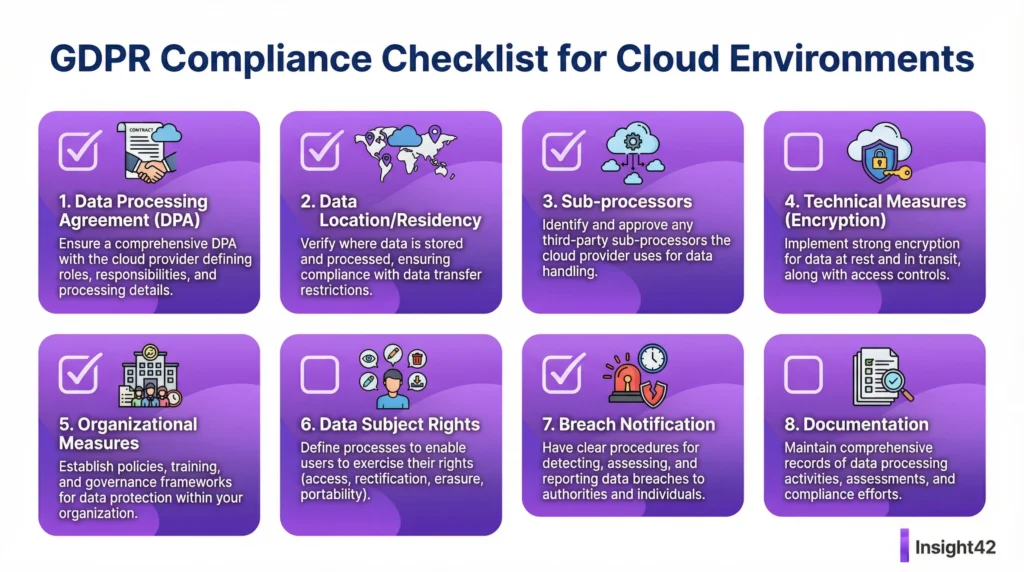
A Guide for Public Authorities
Meta Description: A guide to Data Protection Impact Assessments (DPIAs) for cloud projects in the public sector. GDPR-compliant, secure, and practical.
Why a DPIA is Mandatory for Cloud Projects
The cloud offers enormous opportunities, but it also poses risks to data protection. The General Data Protection Regulation (GDPR) therefore requires a Data Protection Impact Assessment (DPIA) when there is a high risk to the rights and freedoms of natural persons. For the public sector, which works with sensitive citizen data, this is almost always the case for cloud projects.
A DPIA is not an obstacle; it is a tool for risk minimization. It forces a systematic engagement with data protection and creates legal certainty for your cloud project. A missing DPIA can lead to significant fines and the halting of the project.
When Exactly is a DPIA Required?
Article 35 of the GDPR is clear. A DPIA is required, in particular, for:
- Large-scale processing of special categories of data (e.g., health data).
- Systematic and extensive evaluation of personal aspects (profiling).
- Large-scale monitoring of publicly accessible areas.
The German Data Protection Conference (DSK) has published a positive list of processing activities for which a DPIA is generally required. The use of cloud services for specialized procedures with large amounts of data often falls into this category.
The 4 Steps of a Data Protection Impact Assessment
A DPIA follows a structured process. It is not a one-time document but a living process.
Step 1: Systematic Description
- What? What data is being processed?
- Why? What is the purpose of the processing?
- Who? Who are the parties involved (controller, processor)?
- How? What technologies and processes are being used?
Step 2: Assessment of Necessity and Proportionality
Is the processing truly necessary for the purpose? Are there milder, more data-minimizing alternatives? The legal basis must be clear.
Step 3: Risk Assessment
What are the risks to the data subjects (citizens)? (e.g., unauthorized access, data loss, discrimination). The likelihood of occurrence and the severity of the potential harm are assessed.
Step 4: Remedial Measures
What technical and organizational measures (TOMs) will be taken to minimize the risks? This includes encryption, access controls, and contractual arrangements with the cloud provider.
Quick Checklist: DPIA for the Cloud
| Step | Key Question | Done? |
| 1. Description | Is the processing completely described? | ☐ |
| 2. Necessity | Is the legal basis clear and the processing proportionate? | ☐ |
| 3. Risk Assessment | Are the risks to data subjects identified and assessed? | ☐ |
| 4. Measures | Are effective remedial measures defined? | ☐ |
| 5. Documentation | Is the entire DPIA comprehensibly documented? | ☐ |
| 6. Consultation | Must the Data Protection Officer or the supervisory authority be consulted? | ☐ |
To-Do List for the DPIA
- Immediately: Clarify whether a DPIA is mandatory for the cloud project.
- Week 1: Appoint a responsible team for the DPIA.
- Week 2: Involve the Data Protection Officer at an early stage.
- Month 1: Begin the systematic description of the processing.
- Month 2: Conduct the risk assessment.
- Month 3: Define remedial measures with the cloud service provider and the IT security team.
- Ongoing: Update the DPIA whenever the system changes.
The Challenge: Third-Country Transfers
Since the Schrems II ruling, data transfers to the US and other third countries have become complex. Cloud providers like Microsoft (Azure) and Google (GCP) are US companies. A DPIA must explicitly assess this risk.
Remedial measures for this include:
- Standard Contractual Clauses (SCCs): The standard mechanism, but often not sufficient on its own.
- Additional TOMs: Strong encryption (ideally with your own keys – BYOK/HYOK), pseudonymization, anonymization.
- Sovereign Cloud Options: Use of data centers in Germany/EU and contractual assurances (e.g., sovereign cloud Germany).
Insight42: Your Partner for the Cloud DPIA
A DPIA for cloud services requires legal, technical, and procedural knowledge. We connect these worlds. Our Data Protection Impact Assessment consulting is practice-oriented and tailored to the public sector.
We help you identify risks, define effective measures, and design your cloud projects to be legally compliant, in line with BSI C5 and IT Baseline Protection.
Make your data protection future-proof. Contact us.
Figure: The 4-Step Process of a Data Protection Impact Assessment for the Cloud
Blog Post 2: GDPR-Compliant Cloud Usage – TOMs in Azure and GCP
Meta Description: Implementation of Technical and Organizational Measures (TOMs) according to GDPR in Azure and GCP. Practical examples for public authorities.
From Requirement to Technology
Article 32 of the GDPR calls for “appropriate technical and organizational measures” (TOMs) to ensure a level of security appropriate to the risk. But what does this mean in practice in the cloud? How do you translate legal requirements into technical configurations in Azure or GCP?
This article shows how to practically implement the abstract requirements of the GDPR using the native tools of the major cloud platforms. The cloud provider only supplies the tools; the authority, as the controller, is responsible for their correct use.
Mapping GDPR Requirements to Cloud Services
1. Pseudonymization and Encryption (Art. 32(1)(a))
- Goal: Make data unreadable to unauthorized persons.
- Azure:
- Encryption at Rest: Transparent Data Encryption (TDE) for databases, Storage Service Encryption for storage accounts.
- Encryption in Transit: Enforce TLS 1.2+ for all connections.
- Key Management: Azure Key Vault for secure storage and management of keys (Bring Your Own Key – BYOK possible).
- GCP:
- Encryption at Rest: Enabled by default for all services.
- Encryption in Transit: Default for all connections.
- Key Management: Cloud Key Management Service (Cloud KMS), also with a BYOK option.
2. Confidentiality and Integrity (Art. 32(1)(b))
- Goal: Ensure that only authorized persons can access data and that it cannot be altered unnoticed.
- Azure:
- Access Control: Entra ID with Conditional Access and MFA, Privileged Identity Management (PIM) for admin rights.
- Network Security: Network Security Groups (NSGs) and Azure Firewall for segmentation.
- GCP:
- Access Control: Cloud IAM with Conditions, Identity-Aware Proxy (IAP) for Zero Trust access.
- Network Security: VPC Firewall Rules and Cloud Armor.
3. Availability and Resilience (Art. 32(1)(b))
- Goal: Ensure that systems function even in the event of disruptions or attacks.
- Azure:
- High Availability: Use of Availability Zones and Availability Sets.
- Scalability: Virtual Machine Scale Sets, App Service Plans.
- GCP:
- High Availability: Distribution of instances across multiple zones.
- Scalability: Managed Instance Groups (MIGs).
4. Recoverability (Art. 32(1)(c))
- Goal: Be able to quickly restore data and systems after an incident.
- Azure: Azure Backup for backing up VMs, databases, and file shares. Azure Site Recovery for disaster recovery.
- GCP: Backup and DR Service, Snapshots for Persistent Disks.
5. Regular Testing and Evaluation (Art. 32(1)(d))
- Goal: Continuously verify the effectiveness of the TOMs.
- Azure: Microsoft Defender for Cloud for monitoring security configuration and detecting threats. Azure Policy for enforcing compliance rules.
- GCP: Security Command Center for centralized vulnerability and compliance management.
Quick Checklist: Important TOMs in the Cloud
| TOM Category | Measure | Implemented? |
| Encryption | Data-at-Rest & Data-in-Transit fully active | ☐ |
| Access | MFA for all administrative and privileged accounts | ☐ |
| Network | Strict segmentation and firewall rules | ☐ |
| Backup | Regular, tested backups of all critical systems | ☐ |
| Monitoring | Continuous monitoring of security configuration | ☐ |
| Patching | Timely application of security updates | ☐ |
TOMs as Part of the Security Concept
The defined TOMs are a central component of the security concept according to BSI C5 or IT Baseline Protection. They demonstrate how information security objectives are technically implemented. Good documentation of the TOMs is therefore essential not only for GDPR but also for audits according to BSI C5 or ISO 27001.
Cloud consulting for public authorities helps to select and implement the right TOMs for your specific requirements. It is not about doing everything that is technically possible, but what is appropriate for the risk.
Insight42: We Make Your Cloud GDPR-Compliant
We translate the GDPR into the language of the cloud. We configure Azure and GCP to meet the requirements for technical and organizational measures—securely, documented, and auditable.
Our Managed Cloud Operations include the continuous monitoring and optimization of your TOMs. This ensures that your data protection level remains high even as threats and technologies change.
Implement data protection technically. Talk to us.
Figure: Technical and Organizational Measures (TOMs) according to GDPR in the Cloud
Hashtags
#GDPR #DPIA #DataProtection #CloudSecurity #PublicSector #GovTech #Azure #GCP #TOMs #Compliance #BSIC5 #ITBaselineProtection #DataSecurity #CloudMigration #LegalCompliance #Insight42 #SovereignCloud
WordPress SEO Tags (Copy-Paste Ready)
data protection impact assessment cloud, gdpr cloud, technical and organisational measures, toms gdpr, public sector cloud migration, bsi c5 compliant, it baseline protection consulting, sovereign cloud germany, azure data protection, gcp data protection, schrems ii, third country transfer, cloud consulting for authorities, bsi cloud security concept, data security, data protection compliant, data processing agreement, dpa cloud
“))oxiaomi.file(action = “write”, brief = “Translate the seventh blog post file into English”, path = “/home/ubuntu/insight42_blogs/final_docs/en/07_gdpr_dsfa_dpia.md”, text = “# Topic 7: GDPR + DPIA for cloud workloads
Blog Post 1: Data Protection Impact Assessment (DPIA) for the Cloud – A Guide for Public Authorities
Meta Description: A guide to Data Protection Impact Assessments (DPIAs) for cloud projects in the public sector. GDPR-compliant, secure, and practical.
Why a DPIA is Mandatory for Cloud Projects
The cloud offers enormous opportunities, but it also poses risks to data protection. The General Data Protection Regulation (GDPR) therefore requires a Data Protection Impact Assessment (DPIA) when there is a high risk to the rights and freedoms of natural persons. For the public sector, which works with sensitive citizen data, this is almost always the case for cloud projects.
A DPIA is not an obstacle; it is a tool for risk minimization. It forces a systematic engagement with data protection and creates legal certainty for your cloud project. A missing DPIA can lead to significant fines and the halting of the project.
When Exactly is a DPIA Required?
Article 35 of the GDPR is clear. A DPIA is required, in particular, for:
- Large-scale processing of special categories of data (e.g., health data).
- Systematic and extensive evaluation of personal aspects (profiling).
- Large-scale monitoring of publicly accessible areas.
The German Data Protection Conference (DSK) has published a positive list of processing activities for which a DPIA is generally required. The use of cloud services for specialized procedures with large amounts of data often falls into this category.
The 4 Steps of a Data Protection Impact Assessment
A DPIA follows a structured process. It is not a one-time document but a living process.
Step 1: Systematic Description
- What? What data is being processed?
- Why? What is the purpose of the processing?
- Who? Who are the parties involved (controller, processor)?
- How? What technologies and processes are being used?
Step 2: Assessment of Necessity and Proportionality
Is the processing truly necessary for the purpose? Are there milder, more data-minimizing alternatives? The legal basis must be clear.
Step 3: Risk Assessment
What are the risks to the data subjects (citizens)? (e.g., unauthorized access, data loss, discrimination). The likelihood of occurrence and the severity of the potential harm are assessed.
Step 4: Remedial Measures
What technical and organizational measures (TOMs) will be taken to minimize the risks? This includes encryption, access controls, and contractual arrangements with the cloud provider.
Quick Checklist: DPIA for the Cloud
| Step | Key Question | Done? |
| 1. Description | Is the processing completely described? | ☐ |
| 2. Necessity | Is the legal basis clear and the processing proportionate? | ☐ |
| 3. Risk Assessment | Are the risks to data subjects identified and assessed? | ☐ |
| 4. Measures | Are effective remedial measures defined? | ☐ |
| 5. Documentation | Is the entire DPIA comprehensibly documented? | ☐ |
| 6. Consultation | Must the Data Protection Officer or the supervisory authority be consulted? | ☐ |
To-Do List for the DPIA
- Immediately: Clarify whether a DPIA is mandatory for the cloud project.
- Week 1: Appoint a responsible team for the DPIA.
- Week 2: Involve the Data Protection Officer at an early stage.
- Month 1: Begin the systematic description of the processing.
- Month 2: Conduct the risk assessment.
- Month 3: Define remedial measures with the cloud service provider and the IT security team.
- Ongoing: Update the DPIA whenever the system changes.
The Challenge: Third-Country Transfers
Since the Schrems II ruling, data transfers to the US and other third countries have become complex. Cloud providers like Microsoft (Azure) and Google (GCP) are US companies. A DPIA must explicitly assess this risk.
Remedial measures for this include:
- Standard Contractual Clauses (SCCs): The standard mechanism, but often not sufficient on its own.
- Additional TOMs: Strong encryption (ideally with your own keys – BYOK/HYOK), pseudonymization, anonymization.
- Sovereign Cloud Options: Use of data centers in Germany/EU and contractual assurances (e.g., sovereign cloud Germany).
Insight42: Your Partner for the Cloud DPIA
A DPIA for cloud services requires legal, technical, and procedural knowledge. We connect these worlds. Our Data Protection Impact Assessment consulting is practice-oriented and tailored to the public sector.
We help you identify risks, define effective measures, and design your cloud projects to be legally compliant, in line with BSI C5 and IT Baseline Protection.
Make your data protection future-proof. Contact us.
Figure: The 4-Step Process of a Data Protection Impact Assessment for the Cloud
Blog Post 2: GDPR-Compliant Cloud Usage – TOMs in Azure and GCP
Meta Description: Implementation of Technical and Organizational Measures (TOMs) according to GDPR in Azure and GCP. Practical examples for public authorities.
From Requirement to Technology
Article 32 of the GDPR calls for “appropriate technical and organizational measures” (TOMs) to ensure a level of security appropriate to the risk. But what does this mean in practice in the cloud? How do you translate legal requirements into technical configurations in Azure or GCP?
This article shows how to practically implement the abstract requirements of the GDPR using the native tools of the major cloud platforms. The cloud provider only supplies the tools; the authority, as the controller, is responsible for their correct use.
Mapping GDPR Requirements to Cloud Services
1. Pseudonymization and Encryption (Art. 32(1)(a))
- Goal: Make data unreadable to unauthorized persons.
- Azure:
- Encryption at Rest: Transparent Data Encryption (TDE) for databases, Storage Service Encryption for storage accounts.
- Encryption in Transit: Enforce TLS 1.2+ for all connections.
- Key Management: Azure Key Vault for secure storage and management of keys (Bring Your Own Key – BYOK possible).
- GCP:
- Encryption at Rest: Enabled by default for all services.
- Encryption in Transit: Default for all connections.
- Key Management: Cloud Key Management Service (Cloud KMS), also with a BYOK option.
2. Confidentiality and Integrity (Art. 32(1)(b))
- Goal: Ensure that only authorized persons can access data and that it cannot be altered unnoticed.
- Azure:
- Access Control: Entra ID with Conditional Access and MFA, Privileged Identity Management (PIM) for admin rights.
- Network Security: Network Security Groups (NSGs) and Azure Firewall for segmentation.
- GCP:
- Access Control: Cloud IAM with Conditions, Identity-Aware Proxy (IAP) for Zero Trust access.
- Network Security: VPC Firewall Rules and Cloud Armor.
3. Availability and Resilience (Art. 32(1)(b))
- Goal: Ensure that systems function even in the event of disruptions or attacks.
- Azure:
- High Availability: Use of Availability Zones and Availability Sets.
- Scalability: Virtual Machine Scale Sets, App Service Plans.
- GCP:
- High Availability: Distribution of instances across multiple zones.
- Scalability: Managed Instance Groups (MIGs).
4. Recoverability (Art. 32(1)(c))
- Goal: Be able to quickly restore data and systems after an incident.
- Azure: Azure Backup for backing up VMs, databases, and file shares. Azure Site Recovery for disaster recovery.
- GCP: Backup and DR Service, Snapshots for Persistent Disks.
5. Regular Testing and Evaluation (Art. 32(1)(d))
- Goal: Continuously verify the effectiveness of the TOMs.
- Azure: Microsoft Defender for Cloud for monitoring security configuration and detecting threats. Azure Policy for enforcing compliance rules.
- GCP: Security Command Center for centralized vulnerability and compliance management.
Quick Checklist: Important TOMs in the Cloud
| TOM Category | Measure | Implemented? |
| Encryption | Data-at-Rest & Data-in-Transit fully active | ☐ |
| Access | MFA for all administrative and privileged accounts | ☐ |
| Network | Strict segmentation and firewall rules | ☐ |
| Backup | Regular, tested backups of all critical systems | ☐ |
| Monitoring | Continuous monitoring of security configuration | ☐ |
| Patching | Timely application of security updates | ☐ |
TOMs as Part of the Security Concept
The defined TOMs are a central component of the security concept according to BSI C5 or IT Baseline Protection. They demonstrate how information security objectives are technically implemented. Good documentation of the TOMs is therefore essential not only for GDPR but also for audits according to BSI C5 or ISO 27001.
Cloud consulting for public authorities helps to select and implement the right TOMs for your specific requirements. It is not about doing everything that is technically possible, but what is appropriate for the risk.
Insight42: We Make Your Cloud GDPR-Compliant
We translate the GDPR into the language of the cloud. We configure Azure and GCP to meet the requirements for technical and organizational measures—securely, documented, and auditable.
Our Managed Cloud Operations include the continuous monitoring and optimization of your TOMs. This ensures that your data protection level remains high even as threats and technologies change.
Implement data protection technically. Talk to us.
Figure: Technical and Organizational Measures (TOMs) according to GDPR in the Cloud
#GDPR #DPIA #DataProtection #CloudSecurity #PublicSector #GovTech #Azure #GCP #TOMs #Compliance #BSIC5 #ITBaselineProtection #DataSecurity #CloudMigration #LegalCompliance #Insight42 #SovereignCloud