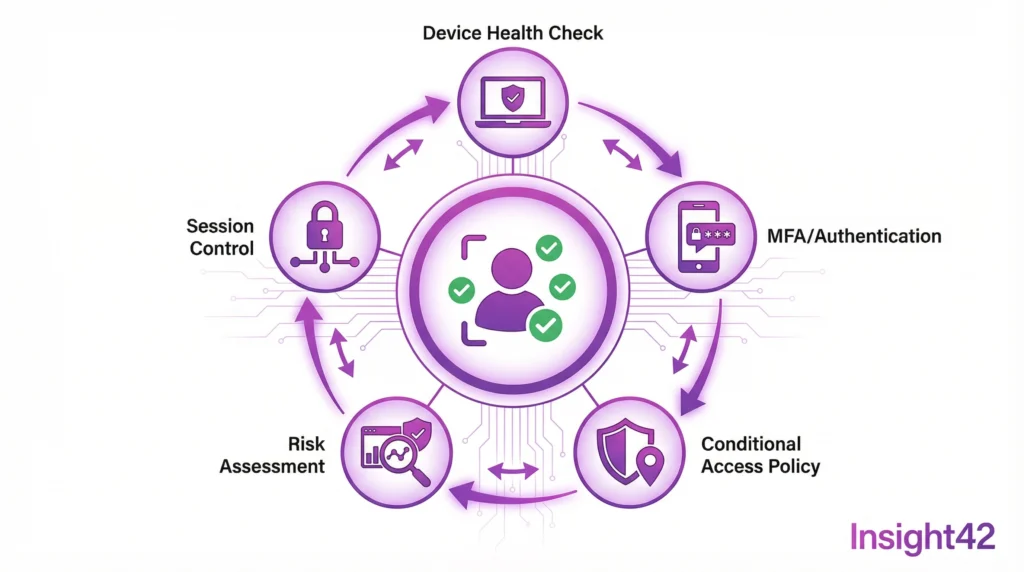
The Path to Zero Trust
Meta Description: Entra ID Migration for Public Authorities is essential for organisations in the public sector seeking to implement SSO, MFA, and Zero Trust. BSI C5 compliant and IT-Grundschutz ready.
Identity is the New Perimeter
Firewalls alone are no longer enough. Employees work from anywhere. Cloud services are distributed. Identity has become the central security anchor. Zero Trust is the answer.
This is particularly relevant for the public sector. Sensitive data must be protected. An Entra ID migration creates the foundation. BSI C5 Cloud requirements are met.
What Zero Trust Means
Zero Trust is a security model: never trust, always verify. Every access attempt is checked. Every identity is validated.
It sounds strict, and it is. But it works. Attacks are made more difficult. Lateral movement is prevented. The BSI-compliant cloud security concept recommends this approach.
The Pillars of Zero Trust
Verify Identity
Who is accessing the resource? Is the person who they claim to be? Multi-Factor Authentication is mandatory. Passwords alone are not enough.
Validate Device
From which device is the access coming? Is it managed? Is it compliant? Conditional Access checks these factors.
Minimize Access
The principle of least privilege applies. Only necessary rights, only for the necessary time. Just-in-Time access becomes the standard.
Monitor Activities
Every access is logged. Anomalies are detected. Automated responses are triggered.
Quick Checklist: Zero Trust Implementation
| Component | Action | Priority |
| MFA | Enable for all users | Critical |
| SSO | Set up Single Sign-On | High |
| Conditional Access | Create baseline policies | High |
| PIM | Implement Privileged Identity Management | High |
| Device Compliance | Define device policies | Medium |
| App Protection | Configure application protection | Medium |
| Monitoring | Monitor sign-in logs | Medium |
To-Do List for Entra ID Migration
- Immediately: Enable MFA for administrators.
- Week 1: Take inventory of identities.
- Week 2: Define the SSO strategy.
- Week 3: Plan Conditional Access policies.
- Month 1: Migrate a pilot group.
- Month 2: Roll out to all users.
- Month 3: Implement PIM.
SSO Simplifies and Secures
Single Sign-On is not a luxury; it is a security feature. Fewer passwords mean less risk. Users use strong passwords because they only need one.
Entra ID enables SSO for thousands of applications, both in the cloud and on-premises. SAML, OAuth, and OpenID Connect are all supported.
SSO is essential for public sector cloud migration. Azure migration and GCP migration benefit. Users work seamlessly while security is maintained.
Implementing MFA Correctly
Multi-Factor Authentication is mandatory. BSI C5 compliance without MFA? Impossible. IT baseline protection consulting requires it, as does NIS2 compliance consulting.
But MFA must be user-friendly. Authenticator apps are standard. Biometrics where possible. Hardware tokens for high security.
Conditional Access makes MFA intelligent. Not for every login, only when there is a risk. Unknown device? MFA. Unusual location? MFA.
Protecting Privileged Identities
Administrators are prime targets. Their accounts have extensive rights. Privileged Identity Management (PIM) protects them.
The principle is Just-in-Time access. Rights are activated only when needed, for a limited time, and with approval.
The BSI-compliant cloud security concept demands these controls. KRITIS cloud security requires them. Insight42 implements them.
Insight42 Identity Services
We are experts in Entra ID migration. Zero Trust is our standard. BSI C5 compliance is our promise.
From strategy to operation, we offer cloud managed services for identity for public authorities, including Azure managed services.
Secure your identities. Contact us.
[Image: Zero Trust Architecture]
Figure: Zero Trust Identity Architecture for Public Authorities
Blog Post 2: Conditional Access and MFA – Intelligent Access Control for Public Administration
Meta Description: Conditional Access and MFA for public authorities. Intelligent, BSI C5 compliant, and IT-Grundschutz-based access control. Secure and user-friendly.
Rethinking Access Control
Old models are obsolete. Once authenticated, always trusted? Dangerous. Conditional Access changes the game. Every access is evaluated. Context is key.
This is revolutionary for the public sector. Security becomes dynamic. User-friendliness is maintained. A cloud-first administration becomes secure.
What Conditional Access Does
Conditional Access is a policy framework that evaluates access in real-time. Who? From where? With what device? To what? These questions are answered.
Based on the answers, decisions are made: allow access, block access, require MFA, or restrict the session.
Understanding the Signals
User and Group
Who is accessing? Administrators have different rules than standard users. Externals different from internals.
Location
Where is the access coming from? Known networks are more trustworthy. Unknown countries are blocked.
Device
Is the device managed? Is it compliant? Unknown devices require additional verification.
Application
Which app is being accessed? Sensitive applications need stronger protection.
Risk
Entra ID automatically assesses risk. Unusual behavior is detected. Compromised accounts are locked.
Quick Checklist: Conditional Access Policies
| Policy | Goal | Action |
| MFA for Admins | Protect privileged accounts | Enforce MFA |
| Blocked Countries | Stop attacks from high-risk regions | Block access |
| Compliant Devices | Allow only secure devices | Require compliance |
| Block Legacy Auth | Prevent insecure protocols | Block |
| Session Timeout | Reduce risk during inactivity | Limit session |
| App Protection | Protect sensitive apps | Require MFA + Compliance |
To-Do List for Conditional Access
- Day 1: Activate report-only mode.
- Week 1: Define baseline policies.
- Week 2: Enforce MFA for all admins.
- Week 3: Block legacy authentication.
- Month 1: Introduce device compliance.
- Month 2: Implement location-based policies.
- Month 3: Implement risk-based policies.
Comparing MFA Methods
Not all MFA methods are equal. Some are more secure, others more user-friendly. The right choice depends on the context.
Microsoft Authenticator
Push notifications are simple. Number matching increases security. Passwordless login is possible.
FIDO2 Security Keys
Hardware-based and phishing-resistant. Ideal for high-security environments. Slightly higher cost.
SMS and Phone
Easy to implement, but less secure. Recommended only as a fallback.
Windows Hello
On-device biometrics. Very user-friendly. Requires compatible hardware.
Meeting Compliance Requirements
BSI C5 Cloud demands strong authentication. Conditional Access delivers it. IT baseline protection consulting confirms compliance.
ISO 27001 based on IT-Grundschutz requires access control. Conditional Access documents every access. Audits are passed.
NIS2 compliance consulting recommends Zero Trust. Conditional Access is a core component. It supports the Data Protection Impact Assessment for the cloud.
Integration with Other Services
Conditional Access does not stand alone. It integrates with Microsoft Defender, uses Intune for device compliance, and connects to SIEM for monitoring.
Public sector cloud migration benefits from this integration. The Azure Landing Zone includes Conditional Access. Azure managed services monitor the policies.
Insight42 Conditional Access Services
We design Conditional Access strategies tailored for public authorities. BSI C5 compliant and user-friendly.
From analysis to implementation, we provide cloud consulting for authorities with a focus on identity and cloud managed services for operations.
Control access intelligently. Talk to us.
www.insight42.de