Microsoft Fabric: (Part 4 of 5)
An insight 42 Technical Deep Dive Series
The Pragmatist’s Guide: Multi-Tenancy, Licensing, and Practical Solutions
In the previous part of our series, we confronted the significant security, compliance, and network separation challenges inherent in Microsoft Fabric’s SaaS architecture. While the vision of a unified data platform is compelling, the practical realities of enterprise adoption require navigating a complex landscape of trade-offs. For many organizations, especially Independent Software Vendors (ISVs) and large enterprises with diverse business units, multi-tenancy is not just a feature—it’s a fundamental requirement.
This post shifts from the theoretical to the practical. We will provide a deep dive into the world of multi-tenant architectures in Microsoft Fabric, dissect the often-confusing licensing model, and offer concrete, actionable solutions and workarounds for the challenges we’ve identified. This is the pragmatist’s guide to making Fabric work in the real world.
Architecting for Multi-Tenancy: Patterns and Best Practices
Achieving tenant isolation is one of the most critical aspects of a multi-tenant architecture. In Fabric, the primary mechanism for achieving this is through workspaces. The recommended approach is to use a workspace-per-tenant model, which provides a strong logical boundary for data and access control [1].
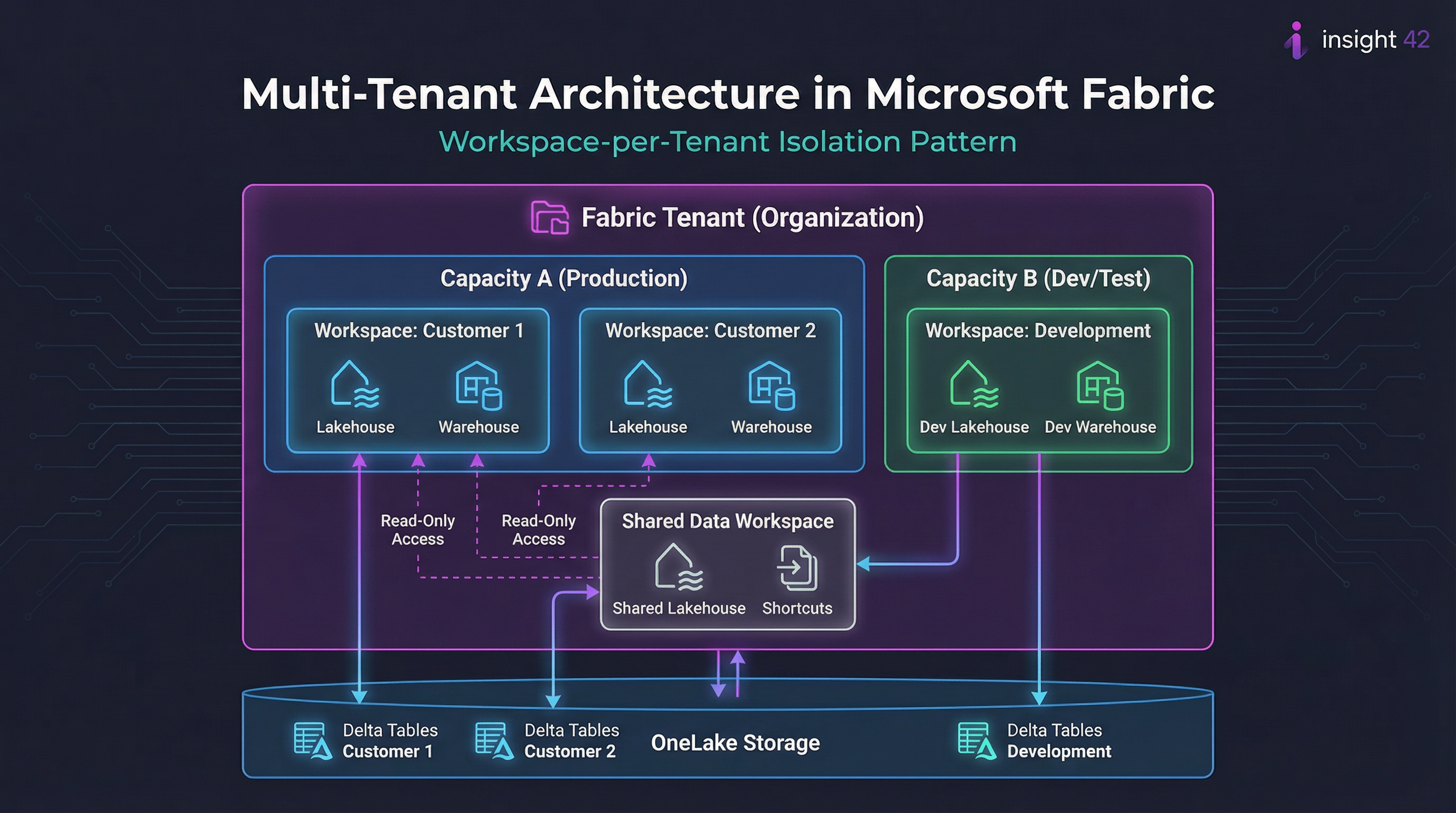
Figure 1: A workspace-per-tenant architecture in Microsoft Fabric, showing isolation within shared capacities and OneLake storage.
The Workspace-per-Tenant Model
This model offers several key advantages that make it the preferred approach for most multi-tenant scenarios:
| Benefit | Description |
|---|---|
| Security | Simplifies security management by isolating permissions at the workspace level. Each tenant’s data remains within their designated workspace. |
| Manageability | Allows for easy onboarding, offboarding, and archiving of tenants without impacting others. Workspace lifecycle can be automated. |
| Monitoring | Enables clear monitoring of resource usage and costs on a per-tenant basis through workspace-level metrics. |
| SLA Management | Provides the flexibility to assign different capacities to different tenants, allowing for varied SLAs and performance tiers. |
| Data Sharing | Shared Data Workspaces with shortcuts enable controlled, read-only data sharing between tenants when needed. |
However, this model is not a silver bullet. While it provides logical isolation, the underlying compute and storage resources may still be shared, which may not be sufficient for all compliance scenarios. This leads to a critical decision point: a single Fabric tenant with multiple workspaces, or multiple Fabric tenants?
Single Tenant vs. Multiple Tenants: A Critical Decision
The choice between these approaches has significant implications for cost, complexity, and compliance:
| Approach | Pros | Cons |
|---|---|---|
| Single Fabric Tenant | Lower licensing costs, easier data sharing between tenants, centralized administration, unified governance. | Weaker isolation, shared fate (a platform issue can affect all tenants), complex compliance story. |
| Multiple Fabric Tenants | Complete data and identity isolation, separate compliance boundaries, independent administration, no shared fate. | Higher licensing costs, complex data sharing, increased management overhead, multiple Entra ID directories. |
For most ISVs and enterprises, the single-tenant, multi-workspace approach provides the best balance of cost, manageability, and isolation. However, for organizations with the strictest security and compliance requirements, the multi-tenant approach may be the only viable option, despite its higher cost and complexity.
Decoding the Fabric Licensing Model
Microsoft Fabric’s licensing model is a significant departure from traditional Azure services and can be a source of confusion. It is a hybrid model that combines capacity-based licensing for the core platform with per-user licensing for certain features, primarily Power BI.
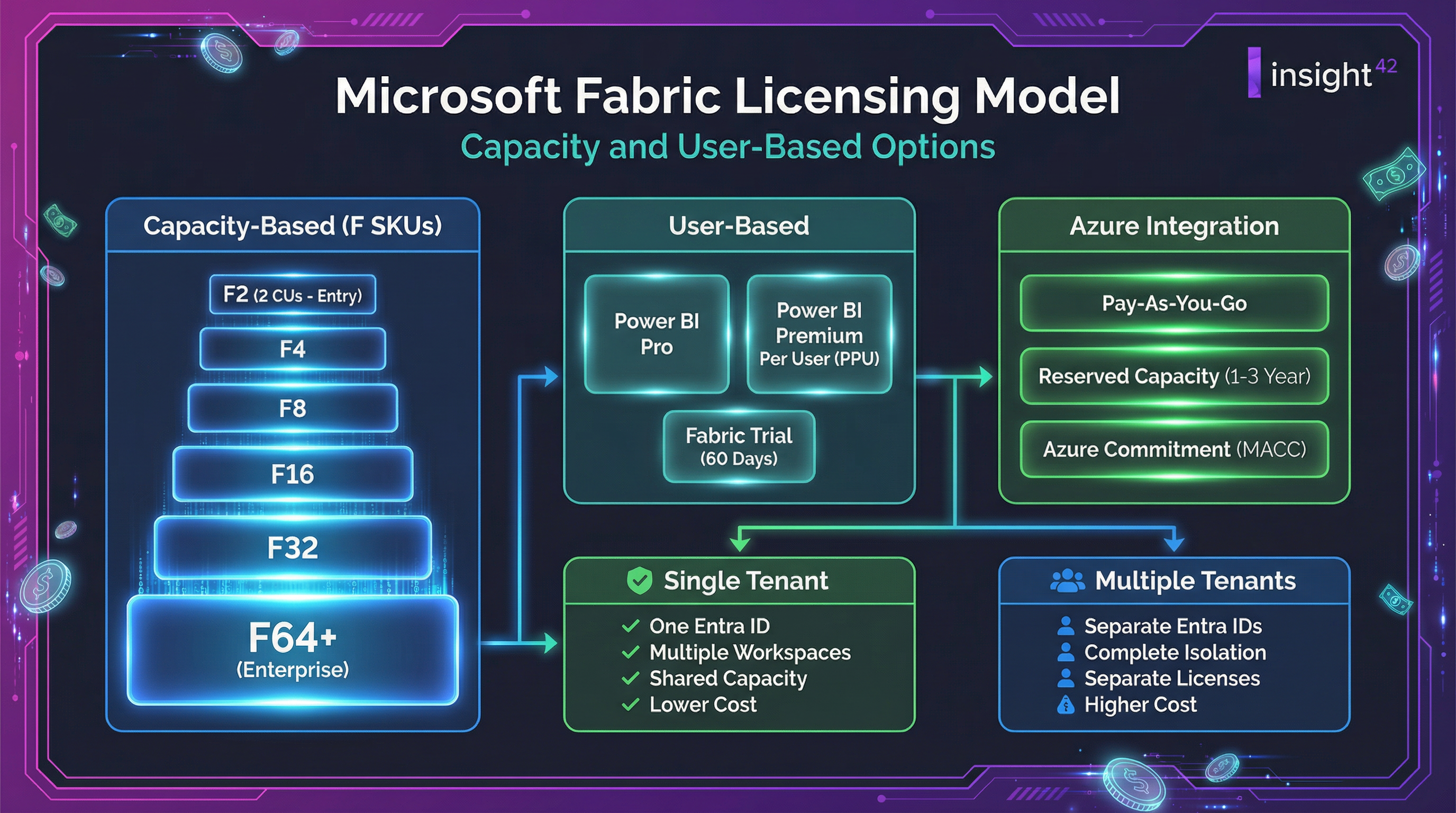
Figure 2: The Microsoft Fabric licensing model, showing capacity-based F SKUs, user-based options, and Azure integration paths.
Capacity-Based Licensing (F SKUs)
The core of Fabric’s licensing is the capacity unit (CU), a measure of compute power. You purchase Fabric capacity in the form of F SKUs, ranging from F2 (2 CUs) to F2048 (2048 CUs). This capacity is shared across all Fabric workloads and can be purchased on a pay-as-you-go basis or as a reserved instance for cost savings [2].
| SKU | Capacity Units | Typical Use Case | Approximate Monthly Cost |
|---|---|---|---|
| F2 | 2 CUs | Development, small workloads | Entry level |
| F4 | 4 CUs | Small teams, POCs | Low |
| F8 | 8 CUs | Departmental analytics | Medium |
| F16 | 16 CUs | Business unit analytics | Medium-High |
| F32 | 32 CUs | Enterprise workloads | High |
| F64+ | 64+ CUs | Large-scale enterprise | Enterprise |
User-Based Licensing
In addition to capacity, certain features require per-user licenses:
| License Type | What It Enables |
|---|---|
| Power BI Pro | Sharing and collaboration on Power BI content |
| Power BI Premium Per User (PPU) | Premium features without capacity purchase |
| Fabric Trial | 60-day trial with limited capacity |
The Multi-Tenant Licensing Challenge
This capacity-based model introduces a significant challenge for multi-tenant architectures: how do you allocate and charge back costs to individual tenants? While Fabric provides monitoring tools to track CU usage, there is no built-in mechanism for enforcing limits on a per-workspace basis. This can lead to a “noisy neighbor” problem, where one tenant consumes a disproportionate amount of resources, impacting the performance of others.
Practical Solutions and Workarounds
Given the limitations of the platform, organizations must adopt a combination of technical and administrative workarounds to manage multi-tenancy effectively:
1. Tiered Service Offerings
Create different service tiers and assign tenants to different capacities based on their tier. This provides a level of performance isolation and a basis for chargeback.
| Tier | Capacity | Features | SLA |
|---|---|---|---|
| Bronze | Shared F8 | Basic analytics, standard support | 99.5% |
| Silver | Shared F32 | Advanced analytics, priority support | 99.9% |
| Gold | Dedicated F64 | Full features, dedicated resources | 99.95% |
2. Monitoring and Governance
Implement a robust monitoring and governance process to track CU usage per workspace and identify noisy neighbors. This may require building custom dashboards and alerting mechanisms on top of the Fabric monitoring APIs.
3. Automation
Use the Fabric REST APIs to automate the creation and management of workspaces, permissions, and other resources. This can help to reduce the administrative overhead of managing a large number of tenants.
4. Strategic Use of Multiple Tenants
For tenants with the most stringent security and compliance requirements, consider using a separate Fabric tenant. While this increases cost and complexity, it may be the only way to meet their needs.
Decision Framework
Use this framework to determine the right approach for each tenant:
| Requirement | Single Tenant | Multiple Tenants |
|---|---|---|
| Cost sensitivity | ✅ Preferred | ⚠️ Higher cost |
| Data sharing needs | ✅ Easy | ⚠️ Complex |
| Compliance requirements | ⚠️ May be insufficient | ✅ Full isolation |
| Administrative simplicity | ✅ Centralized | ⚠️ Distributed |
| Performance isolation | ⚠️ Logical only | ✅ Physical |
The Verdict: A Platform of Compromises
Microsoft Fabric is a platform of compromises. It offers a simplified, all-in-one experience at the cost of the granular control and isolation that many enterprises are used to. While the workspace-per-tenant model provides a viable path for multi-tenancy, it is not without its challenges, particularly when it comes to licensing and cost management.
Key Insight: Successfully implementing a multi-tenant solution on Fabric requires a deep understanding of its architecture, a pragmatic approach to its limitations, and a willingness to build custom solutions and workarounds to fill the gaps.
It is not a turnkey solution, but for those willing to invest the time and effort, it can be a powerful platform for building the next generation of data and analytics applications.
In the final part of our series, we will look to the future. We will explore Fabric’s long-term trajectory, its innovative “shortcut” feature for connecting to other hyperscalers, and its ultimate vision of becoming the central hub for the entire data estate.
References
[1] Microsoft Fabric – Multi-Tenant Architecture
[2] Microsoft Fabric licenses
← Previous: Part 3: Security, Compliance, and Network Separation | Next: Part 5: Future Trajectory and the Hub Vision
#FabricMultiTenancy #FabricLicensing #CostManagement #FabricCostControl #WorkspacePerTenant #FabricFSU #LicensingOptimization #MultiTenantArchitecture #FabricCapacity #EnterpriseFabric #FabricWorkarounds #DataPlatformCost #CloudCostManagement #FabricImplementation #DataAnalytics